14 May 2008


What sucks about Apple's MagSafe power adapter

It's been nearly a year since anything went wrong with my MacBook laptop, but overall, it hasn't been a paragon of reliability. The battery, motherboard, fan, DVD drive, and hard disk have all (!) needed service. Now there's this:
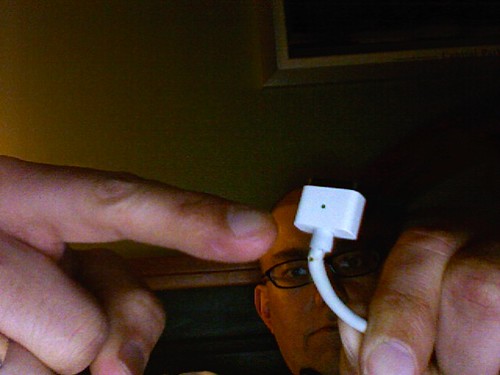
My MacBook's Magsafe adapter is wearing out

UPDATE: It looks like AppleCare will replace the adapter for me, no charge. I'm taking the old one in to a local Apple dealer today.

Right from when it was announced in 2006, I thought the MagSafe power connector, which pops out if you trip over the cord rather than dragging your laptop to the ground, was a smart idea. But the sharp angles and minimal strain relief of the design also seemed fragile to me, and I appear to have been right. I know several people whose MagSafe adapters have failed exactly as mine is: the cord wears through right next to the computer end of the connector.

Conversely, my wife's round iBook connector continues to work just great, even though it is a year older, and it's rare to hear of those adapters failing in a similar way at all. The new MagSafe design for the MacBook Air seems like it might be sturdier, but I don't think the actual power brick is rated for enough voltage for my bigger MacBook.

The pity is, because Apple has patented the MagSafe design and has not licensed it to other manufacturers, you can't buy yourself a third-party MagSafe-compatible power adapter with a better connector. So whether AppleCare warranty covers it or not, I'll end up with a similar flawed design, which may fail on me again in a year or two.

Labels: , , ,


22 February 2008


MooseCamp 2008 photos

Here are my latest photos from MooseCamp, which was the first day of Northern Voice. I've also posted some wacky night pictures from the way home.

At MooseCamp I had a chance to try out a Nikon D3 camera belonging to Matt Mullenweg. It's extremely impressive, probably the most solidly built camera I've ever held. But it is freaking huge—more massive than some medium-format cameras, I think. In contrast, John Biehler's new MacBook Air is shockingly light. Hold one and you'll understand what the fuss is about.
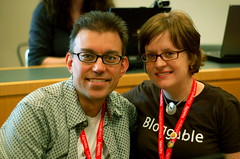
MooseCamp 2008 - The Millers MooseCamp 2008 - Voxant MooseCamp 2008 - Voxant MooseCamp 2008 - Voxant MooseCamp 2008 - Voxant MooseCamp 2008 - Voxant MooseCamp 2008 - Voxant MooseCamp 2008 - The Lounge MooseCamp 2008 - The Lounge MooseCamp 2008 - Streaming video MooseCamp 2008 - Streaming video MooseCamp 2008 - Streaming video MooseCamp 2008 - Streaming video MooseCamp 2008 - Streaming video MooseCamp 2008 - Streaming video MooseCamp 2008 - Streaming video MooseCamp 2008 - Streaming video MooseCamp 2008 - Videoblogging MooseCamp 2008 - Videoblogging MooseCamp 2008 - Videoblogging MooseCamp 2008 - Videoblogging MooseCamp 2008 - PhotoCamp MooseCamp 2008 - PhotoCamp MooseCamp 2008 - PhotoCamp MooseCamp 2008 - PhotoCamp MooseCamp 2008 - PhotoCamp MooseCamp 2008 - Men's bathroom wall MooseCamp 2008 - PhotoCamp MooseCamp 2008 - PhotoCamp MooseCamp 2008 - PhotoCamp MooseCamp 2008 - PhotoCamp MooseCamp 2008 - PhotoCamp MooseCamp 2008 - PhotoCamp MooseCamp 2008 - PhotoCamp MooseCamp 2008 - PhotoCamp MooseCamp 2008 - PhotoCamp MooseCamp 2008 - WordPress session MooseCamp 2008 - MacBook Air MooseCamp 2008 - WordPress session MooseCamp 2008 - WordPress session MooseCamp 2008 - WordPress session MooseCamp 2008 - WordPress session MooseCamp 2008 - WordPress session MooseCamp 2008 - WordPress session MooseCamp 2008 - The Millers MooseCamp 2008 - WordPress session MooseCamp 2008 - Cogdog MooseCamp 2008 - Thanks from Boris MooseCamp 2008 - Thanks from Boris Post-MooseCamp pub night Post-MooseCamp pub night Post-MooseCamp pub night Post-MooseCamp pub night Post-MooseCamp pub night Post-MooseCamp pub night

Labels: , , , , , , , , ,


15 January 2008


Is the MacBook Air for you?

UPDATE: As of February 15, John Gruber has a good analysis of why the MacBook Air is likely to be a big success. My wife (who fits into his typical purchaser category) really wants one despite loving her smaller 12" iBook, but is likely to wait until the 1.0 bugs are worked out.

145755-DSC_0051 at Flickr.comApple's new MacBook Air is, as usual and expected, a pretty sexy laptop computer. It'll sell well. But those who've been waiting two years for a replacement for the 12-inch PowerBook or iBook, it may not be quite the thing.

My wife has a 12-inch iBook, and I know several people who still hold on to their little PowerBooks, because up till now the regular-size MacBook like I have is bigger than they'd prefer. The thing is, not many people in the 12" laptop camp think the old MacBook is too thick—they think it's too wide, and the new MacBook Air is exactly the same width (32.5 cm) and depth (22.7 cm). Sure, it's almost a kilogram lighter and close to half the thickness, so it's easier to carry, but the MacBook Air isn't really a subnotebook computer.

It has other limitations too, aside from the lack of FireWire, CD/DVD drive, analog audio in, or included wired Ethernet. While the battery life is surely impressive (especially if you spring the extra $1000 for the solid-state disk instead of the regular hard drive), you can't swap out the battery at all: it's sealed inside, like an iPod's. Since batteries are one of the first things to wear out in a laptop, it's good that Apple will swap a new one for just the price of the battery, no installation fee, but if you're on the road and would normally swap in a new battery during a long day without a power plug, you're out of luck.

So if you like thin and light and sexy and agree with Apple that (a) widescreen is still the way to go but (b) it would be cool if you could slide it into a manila envelope, then this is the computer for you. If you want genuinely small like its old PowerBook and iBook predecessors, perhaps not.

Oh, and what's with the $100 price premium in Canada, and more cost for the solid-state disk too? (The external optical drive is $100 in both the U.S. and Canada.) It's 2008, Apple, the Year of Dollar Parity!

Labels: , ,


12 November 2007


Whither the Apple subnotebook?

Mini Mac notebook concept mockupEver since Apple replaced the trusty iBook and PowerBook G4 series of laptops with the MacBook line in 2006, Apple fanboys and -girls round the world have been clamouring for a smaller, lighter ultraportable Mac, along the lines of the 12" PowerBook or 12" iBook like my wife owns. The 13" MacBook (like mine) is a fine computer, but it's not quite as backpackable as its predecessors.

Now that her iBook is coming up on its third birthday, my wife might appreciate fresh rumours that Apple might be announcing a super-thin MacBook in January. These rumours have been around forever (almost as long as those about a Mac tablet), but they're picking up steam this week.

I wouldn't place any bets, but if you're in the market for a small Mac notebook (rather than a ginormous one, which Apple has been happy to sell you for years) and can wait till January, you might just be in luck. Or not. You never know with these guys.

Labels: , ,


01 November 2007


Mac OS X 10.5 Leopard first impressions

Leopard with proper menu bar at Flickr.comSo far I've installed Apple's new operating system on three computers (a MacBook, an iBook, and an iMac), and in each case it's gone quite smoothly. The most awkward part was clearing space on my MacBook and my wife's iBook—we're both prone to stuffing the hard disk almost to the brim.

I followed John Gruber's advice, creating a bootable backup first (something I've always done for previous upgrades), then performing a simple upgrade installation, without my usual overcautious "install and migrate" procedure.

Overall it's an unremarkable transition, and I mean that positively. There are cosmetic changes, some good, some bad, but everything operates pretty much as before. My unexpected favourite new features are Spaces (I never liked virtual desktops before, but Spaces is so seamless it really works for once), Quick Look, and screen sharing (sure to be a godsend for remote tech support with my in-laws). Oh, and Spotlight search actually works now.

Like many others, I dislike the new translucent menu bar, which doesn't mesh with the desktop pictures I prefer. But there's an easy solution: I just edited my desktop picture to have a white strip across the top the same height as the menu bar, and now it's back to readable again.

Labels: , , ,


15 September 2007


Video of my appearance at Gnomedex

Chris Pirillo has posted video of my piped-in appearance (from my bed) at Gnomedex last month:

A few people asked about it, and now there it is. Thanks, Chris.

Labels: , , , , , ,


12 September 2007


The brightness

I was a bit disturbed this morning when I sat down on the porch with my MacBook and saw a strange bright blob in the middle of the LCD screen. I thought the display might be damaged, but when I moved the laptop the spot went away.

Then I realized that the spot was actually the light of the sun, which is so bright that it is shining through the translucent Apple logo on the back of the lid, and illuminating the centre of the screen from behind. (Normally the logo is lit up the opposite way, by the lamp from the LCD panel.) I guess you could call it a design flaw.

Labels: , , , ,


12 August 2007


Next best thing

Chris Pirillo & Derek Miller at Flickr.comI love attending the annual Gnomedex geek conference in Seattle, but this year I just wasn't in shape to do it. So we did the next best thing: organizers Chris and Ponzi Pirillo asked me to give a little talk and answer some questions via live video chat yesterday, and I think it worked rather well.

Even among the digital leading edge who attend Gnomedex, being as wide open about cancer diagnosis and treatment online, as I have been, is still a bit unusual, but I hope that my appearance there encourages people not only to use the Internet as a way to get information and support, but also to get themselves checked out for the various diseases they might be at risk for, so that they can maybe get treated early and not have to go through all the crap I have.

One of the audience members who said hi (I think her name was Dawn) also reminded me not to get consumed by all this, not to let my condition become my life, and I think that was good advice. As I've said before, I'm trying to come back to life, to see movies and have fun with my family and friends, and to blog about something other than cancer from time to time—and more often as I get better.

Today I cooked some bacon and eggs and made coffee, which is the first time I've had enough energy for that. But yesterday I spent almost the whole day (including my video chat session) in bed. Maybe later today I'll get out for a walk, or go to the mall or a restaurant. I just have to see how I feel.

Thank you to all the Gnomedexers who attended my session yesterday. Once again, your support and good vibes humble me.

Labels: , , , , , ,


23 June 2007


Saving Tod Maffin's bacon via cross-country tech support

Saving Tod Maffin's bacon via cross-country tech support: live! at Flickr.comBecause I'm still recovering from all the radiation and chemotherapy and such, I can't attend the Podcasters Across Borders conference in Kingston, Ontario this weekend.

However, I was able to provide cross-country phone tech support to get Tod Maffin out of a bind when his Mac Finder kept repeatedly crashing right before his 8 p.m. (EDT) presentation. We even delved into some Unix permissions wizardry for good measure.

Good luck Tod!

And yes, I'm feeling better today, so I think it's okay if I gloat a little.

UPDATE: Here's a photo of the presentation Tod gave:

Tod's presentation

Labels: , , , , , , , , ,


21 June 2007


Backups mean not having to say you're sorry

DSC_4982 at Flickr.comIt turns out that my dead hard disk is still well under its five-year warranty, and that Seagate, the manufacturer, has an efficient online return system that helped me diagnose and then set up a return merchandise authorization (RMA) for it, including printing a shipping label for me.

So rather than go through the rigamarole of trying to rescue any data from the drive (as far as I can tell, it's not even spinning up), I mailed it off to Ontario a couple of days ago, and Seagate will send me a new replacement that I can drop in its place. In the meantime I'm using the stock MacBook hard disk, and it's working fine.

Because of my backup regimen, I lost so little data that all I've had to do is go through a few pages of my Flickr photos and re-import the missing ones into iPhoto—nothing else critical is missing. At least not that I've discovered so far.

So I should have a new drive to put into the MacBook next week, and I can use the one I have now once again as an external backup. One thing I do need to do is take some of my recent backups offsite, because right now I'm protected against failures, but if we get burglarized or the house burns down, important data could still be at risk.

You should do the same with your backups. You do have backups, don't you?

Labels: , , , , ,


17 June 2007


The curse of the MacBook

SpinRite on MacBook at Flickr.comI thought that a few months ago, when my MacBook laptop finally returned from getting a new heat sink, fan, and battery, it would be stable. But no. Today I was working away, just having uploaded a bunch of photos to Flickr, when the MacBook froze up, which is unusual. I rebooted it.

Click click, said the hard disk. No booting. Grey screen, as if there were no disk inside at all. Not good. This disk is completely invisible to the utilities I own, as if it wasn't even there. I have backups, and very little data on the drive doesn't exist somewhere else, so that's not my worry—I learned my backup lessons years ago.

But it is certainly annoying. The 100 GB, 7200 rpm SATA disk drive is just over a year old: I installed it when I bought the MacBook, putting the stock drive in an external USB housing. It should have lasted much longer than this, but I suspect that all the nasty sudden power shutdowns with the battery problems I had may have damaged it, so that it decided to die today.

I'm typing on the MacBook now, having restarted from my external FireWire backup drive. I've reinstalled the original stock 80 GB, 5400 rpm hard drive and am copying over my data files so that it will work again. It should be in relatively normal shape later tonight.

But I'm not giving up on the bigger, faster drive yet. I don't trust it, but I want to see if I can bring it back to life again. The excellent DOS-based utility SpinRite apparently performs miracles on dead drives like that quite regularly. My dad owns a copy, but it's not intended to run on Macs, and sure enough, when I tried booting his CD on the Intel-based MacBook, it started up fine, but did not recognize the keyboard, so I couldn't do anything.

I'm going to see if I can get a SATA-to-IDE adapter to hook up the disk to one of my dad's Windows PCs, which will run SpinRite and may be able to get the disk working again.

Regardless, I will probably have to get another new internal drive (maybe a bigger one now, 160 GB or 200 GB) as the main one for this machine in the long run. I like this laptop and it has done great work for me, but it's sickly, to be honest.

Labels: , , , , ,


29 May 2007


Major repairs

Groovy Geekbag 5 at Flickr.comMy MacBook is officially one year old this week. Despite our somewhat checkered history over the past 12 months, it is now behaving as it should and is doing a great job with all the stuff I throw at it.

Which is, I guess, more than I can say for my own body these days. I'll be taking myself into the shop in a couple of months too, so both the MacBook and I will have seen major repairs in 2007.

I hope my own goes just as well.

Labels: , , , , ,