Penmachine
23 April 2010
Geek office cleanout redux
Almost five years ago, I cleaned out a bunch of old electronics and cardboard from my office/studio downstairs. Yesterday, Earth Day, I got started on it again, this time shipping out four old CRT monitors, two printers, two desktop Macs, an old PowerBook, a couple of keyboards, a scanner, an external CD-ROM drive, a broken camcorder, and a whole mess of wires:

I had an incentive to do it today because, on her way to work, my wife Air noticed a one-day Earth Day electronics recycling event at Killarney Secondary School, which is where I took the heap. It was gone in less than five minutes.
My happiest discard was a drawer full of particularly beige SCSI cables, adapters, and terminators. If you've grown up connecting things to computers with USB or FireWire or Ethernet cables, or using Wi-Fi, be thankful you didn't have to deal with SCSI and its predecessors, which often required flipping tiny switches, swapping cables around, adding thick cable terminators to devices in apparently random combinations, and fiddling with software—and still often didn't work right. Good riddance, SCSI cables:
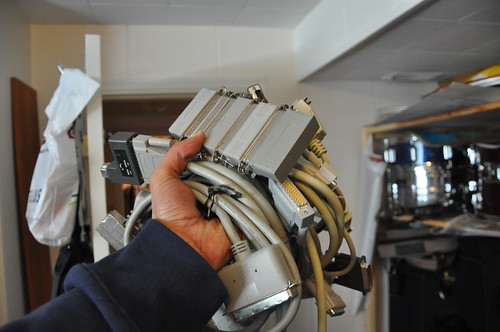
I felt like Perseus with the head of Medusa there. And yes, I reformatted my hard disks before donating them.
Labels: apple, geekery, green, home, memories, school
17 April 2010
Pretty psychedelic, man
Thank you, Kimli, for finding PhotoTropedelic for the iPhone. It is just too much fun:

Labels: apple, friends, iphone, pets, photography
28 January 2010
Living in the future
 Not having seen or touched Apple's new iPad myself, I can't contribute much new to the vast conversation that has been swirling around this device over the past day. But I can say two things:
- Until yesterday I would have planned to replace my current MacBook with another laptop when it wears out. I’d now consider getting an iMac (or even maybe a Mac Mini) as a primary computer, and using an iPad as a living room/kitchen/bedtime/on the road companion device. In the roughly-$2000 price range you could get a 15-inch MacBook Pro, or a 21-inch iMac, plus an iPad. I can see a lot of power users and tech heads going that route.
- We'll get used to it, but iPad is a dumb name. On a lark, I started a Facebook group suggesting that we call it the Slabapple, which is also a dumb name I made up, but which I think is less dumb than iPad. Feel free to join us, for whatever that's worth.
The key thing, I think, is that this is the first version of the device. My guess is that it will have legs, and that—as happened with the iPhone—whatever iPad is available in two or three years will have everyone forgetting the many complaints about today's version.
P.S. Oh, and this (via Jeff Croft).
Labels: apple, controversy, gadgets, geekery, imac, ipad, macbook
05 November 2009
Don't try to get an iPhone the first day
Today was the first day that my mobile carrier, Telus Mobility (once BC Tel, the former British Columbia telephone monopoly), offered Apple's iPhone for sale. I've been a Telus mobile customer since 1998, and have generally had a good experience with customer service, wireless coverage, and phone performance—quite in contrast with how I felt when I quit using Telus broadband Internet four years ago.
I've decided to get an iPhone. I've had a first-generation iPod Touch (kindly given to me by my employer Navarik) for two years now, and my wife has been using an iPhone 3GS on the rival Rogers network since earlier this year. The combination of my iPod Touch and LG Shine 8700 flip phone has worked just fine for me, but I've also seen what those two lack and the current iPhones offer—the camera, GPS, always-accessible email and web surfing, better speed, and so on.
However, today, the first day, was not the one for me to try upgrading. With a little over a year left on my current phone contract, the basic policy is that I'd have to spend several hundred dollars more than the fully-subsidized $200 price for a new iPhone 3GS, and I'm not interested in that. But because I've been with them so long, Telus has offered me deals in the past—if I talk to their phone reps first.
Yet while there seemed to be plenty of iPhones on hand, the Telus retail computer system for its storefront franchisees was up and down all day, the phone customer service was overwhelmed, and I was unable, despite a couple of long waits on hold and a dropped call, to find out whether I would be able to get buy one cheaply. By the time I tried phoning a second time after that dropped connection, Telus wasn't even accepting new calls (!).
I had to step back and stop fuming that this was yet another occasion when a wireless carrier turned an exciting prospect into a frustrating runaround—you know, "I want to give the company more money, but it doesn't seem to want to take it." Yes, Telus should probably have been better prepared to handle the obviously substantial demand for this crazy phone. But the people I talked to were all unfailingly friendly and as helpful as they could be. They were simply let down by a technical sales infrastructure that didn't work for any of us.
Patience is still worthwhile. I'll wait a few days and try again. Telus hasn't quite blown it for me this time. Not yet.
Labels: apple, iphone, shopping, telecommunications, telus
19 October 2009
Links of interest (2009-10-19):
From my Twitter stream:
- My dad had cataract surgery, and now that eye has perfect vision—he no longer needs a corrective lens for it for distance (which, as an amateur astronomer, he likes a lot).
- Darren's Happy Jellyfish (bigger version) is my new desktop picture.
- Ten minutes of mesmerizing super-slo-mo footage of bullets slamming into various substances, with groovy bongo-laden soundtrack.
- SOLD! Sorry if you missed out.
I have a couple of 4th-generation iPod nanos for sale, if you're interested. - Great backgrounder on the 2009 H1N1 flu virus—if you're at all confused about it, give this a read.
- The new Nikon D3s professional digital SLR camera has a high-gain maximum light sensitivity of ISO—102,400. By contrast, when I started taking photos seriously in the 1980s, ISO—1000 film was considered high-speed. The D3s can get the same exposure with 100 times less light, while producing perfectly acceptable, if grainy, results.
- Nice summary of how content-industry paranoia about technology has been wrong for 100 years.
- The Obama Nobel Prize makes perfect sense now.
- I like these funky fabric camera straps (via Ken Rockwell).
- I briefly appear on CBC's "Spark" radio show again this week.
- Here's a gorilla being examined in the same type of CT scan machine I use every couple of months. More amazing, though, is the mummified baby woolly mammoth. Wow.
- As I discovered a few months ago, in Canada you can use iTunes gift cards to buy music, but not iPhone apps. Apple originally claimed that was comply with Canadian regulations, but it seems that's not so—it's just a weird and inexplicable Apple policy. (Gift cards work fine for app purchases in the U.S.A.)
- We've released the 75th episode of Inside Home Recording.
- These signs from The Simpsons are indeed clever, #1 in particular.
- Since I so rarely post cute animal videos, you'd better believe that this one is a doozy (via Douglas Coupland, who I wouldn't expect to post it either).
- If you're a link spammer, Danny Sullivan is quite right to say that you have no manners or morals, and you suck.
- "Lock the Taskbar" reminds me of Joe Cocker, translated.
- A nice long interview with Scott Buckwald, propmaster for Mad Men.

Labels: animals, apple, biology, cartoon, geekery, humour, insidehomerecording, iphone, ipod, itunes, linksofinterest, nikon, photography, politics, science, surgery, television, video, web
14 October 2009
iPods across oceans and continents
When we sold our old laptop recently, we used the money to buy a couple of iPod touches for our kids. I know, we spoil them terribly and all that. Ours is a geek house. Get used to it. (And if you're interested in their old iPod nanos, those are for sale too—let me know.)
Ordering online, I presumed (naively) that while the iPods are of course made in China, there would probably be a North American distribution centre where they are individually laser engraved and then shipped to customers here. But Apple and UPS let you track your order. Ours shipped directly out of China, and the results are a bit depressing.
There's been a lot of hoopla about Apple pulling out of the U.S. Chamber of Commerce over the Chamber's poor climate-change policies, Apple's greener laptops made with more recyclable materials, and so on, but I have to wonder whether many of those efforts are being negated by the insanely inefficient transport routes taken by items shipped from the online Apple Store.
Although I ordered two identical devices (with separate custom engraving on the back of each) at the same time, as part of the same order, here's how the two iPods are getting to our house:
- iPod #1: Shanghai, China → Anchorage, Alaska → Louisville, Kentucky → Buffalo, New York → Mount Hope, Ontario → Winnipeg, Manitoba → Calgary, Alberta → Richmond, B.C. → Burnaby, B.C.
- iPod #2: Shanghai, China → Anchorage, Alaska → Louisville, Kentucky → Lachine, Québec → Montréal, Québec → Mount Hope, Ontario → Calgary, Alberta → Richmond, B.C. → Burnaby, B.C
Same order, same type of device, same factory. But apparently, the most cost-effective way to get them to me was to send them together from Shanghai to Anchorage to Louisville, then to separate them, sending one via New York, Ontario, Manitoba, and Alberta, and the other via Québec, Ontario, and Alberta. Both passed through Mount Hope and Calgary, but at different times. They're both now in Richmond on the way here to Burnaby, hopefully on the same truck (but I'm not sure of that—see below for an unimpressive update).
It's about 9,000 km direct from Shanghai to Vancouver by plane, but on these routes each iPod has traveled almost twice that far (around 17,000 km) by plane and truck, with takeoffs, landings, and transfers. I know the packages are small, but the price of shipping that way can't possibly be taking into account the relative energetic and environmental costs of the two routes.
Never mind that, by essentially excluding environmental effects, it's less expensive to manufacture the iPods an ocean away to start with. How do these transactions add up, when you multiply them by the millions?
If we're interested in ameliorating climate change, I think that we'll have to address the mismatch between the monetary efficiency and energetic inefficiency of these haphazard transportation methods. But that will likely mean that our gadgets will get more expensive in the short term, in order to make our lives more tolerable in the long term. I have a feeling that, with our generally shortsighted human thinking, we might not be willing to accept that.
And that's a bit of a bummer.
UPDATE 11:30 a.m.: There's something amusing about the situation now. Both iPods arrived at Vancouver International Airport in Richmond before sunrise this morning, after making their way halfway around the world, rapid-fire, in five days. But they've now, apparently, been sitting at YVR, about 12 km away from my house, for three and a half hours without being loaded on a truck, because of "adverse weather conditions." What are those conditions? It's raining a bit. In Vancouver, in the autumn.
FURTHER UPDATE 2:00 p.m.: Delivery. Of one of the iPods. They were both at the airport, both supposedly delayed by weather (though it's sunny now), and one got put on a truck and arrived at the house a few minutes ago. The other one, presumably, is coming on another truck. Point reinforced. Next time I'll buy retail, where I can at least assume that two of the same product from the same batch came to the store in the same vehicle.
FINAL UPDATE 5:00 p.m.: The delay of the second shipment at YVR is a mystery even to the friendly UPS phone rep. It will be delivered tomorrow, taking longer to travel the 12 km from the airport to my house than it did to traverse the 3500 km from Ontario to the West Coast yesterday.
Labels: apple, china, environment, ipod, transportation, vancouver
06 October 2009
Telus and Bell go iPhone in Canada
Things have been all a-twitter about Canadian mobile carriers Bell and Telus (my cell phone provider) starting to sell Apple's iPhone, supposedly next month. My wife Air told me the scoop yesterday, and I was surprised, and skeptical.
But it sounds like it's really happening. This is a bigger deal than it seems if you don't follow the mobile phone industry, for two reasons:
- In most markets, Apple has an exclusive arrangement with a single carrier to sell the iPhone. Until now in Canada, that has been with Rogers Wireless and its subsidiary Fido, and in the U.S. it remains AT&T Wireless. Having competing carriers all with the iPhone is unusual.
- The iPhone uses the most common mobile phone radio standard in the world, known as GSM. However, until now both Bell and Telus have used a competing and incompatible standard, CDMA, also used by Verizon and Sprint in the U.S.A.
In North America, many mobile phones (such as BlackBerry devices) come in both CDMA and GSM versions for different carriers, but the iPhone has been GSM-only since its introduction in 2007. It turns out that Bell and Telus have been installing some GSM technology on their cellular towers for at least a year, and planning to have it ready for many customers in 2010.
But now it looks like they'll be early, and the iPhone may be their first big rollout of 3G (third-generation) GSM wireless. And although it will be awhile, my old CDMA phone is likely on the way to becoming obsolete. Qualcomm, which owns the CDMA patents and licenses them to carriers and device makers, had better be looking for some new way to make money.
Labels: apple, canada, geekery, iphone, telecommunications, telus
17 August 2009
My video course now at London Drugs
Remember my GarageBand training video? The one you can buy from MacVideoTraining (with a 20% discount using the checkout promo code ihr)? This one?
It's now available online from London Drugs too, as well as on DVD in their stores here in Western Canada. Why not buy some copies for your friends (and enemies, for that matter)?
Labels: apple, education, insidehomerecording, itunes, paulgaray, recording, software, video
28 June 2009
Links of interest 2006-06-21 to 2006-06-27
While I'm on my blog break, more edited versions of my Twitter posts from the past week, newest first:
- My wonderful wife got me a Nikon D90 camera for my 40th birthday this week. I'm thinking of selling my old Nikon D50, still a great camera. Anyone interested? I was thinking around $325. I also have a brand new 18–55 mm lens for sale with it, $150 by itself or $425 together. I have all original boxes, accessories, manuals, software, etc., and I'll throw in a memory card, plus a UV filter for the lens.
- Roger Hawkins's drum track for "When a Man Loves a Woman" (Percy Sledge 1966): tastiest ever? Hardly a fill, no toms, absolutely delicious.
- Thank you thank you thank you to everyone who came to my 40th birthday party—both for your presence and for the presents. Photos from the event, held June 27, three days early for my actual birthday on Tuesday, are now posted (please use tag "penmachinebirthday" if you post some yourself).
- I think Twitter just jumped the shark. In trending topics, Michael Jackson passed Iran, OK, but both passed by Princess Protection Program (new Disney Channel movie)?
- AT&T (and Rogers, presumably) is trying to charge MythBusters' Adam Savage $11,000 USD for some wireless web surfing here in Canada.
- After more than 12 years buying stuf on eBay, here's our first ever item for sale there. Nothing too exciting, but there you go.
- Michael Jackson's death this week made me think of comparisons with Elvis, John Lennon, and Kurt Cobain. Lennon and Cobain still seemed to have some artistic vitality ahead of them. Feel a need for Michael Jackson coverage? Jian Ghomeshi (MP3 file) on CBC in Canada is the only commentator who isn't blathering mindlessly. But as a cancer patient myself, having Farrah Fawcett and Dr. Jerri Nielsen (of South Pole fame) die of it the same day is a bit hard to take.
- Seattle's KCTS 9 (PBS affiliate) showed "The Music Instinct" with Daniel Levitin and Bobby McFerrin. If you like music or are a musician, it's worth watching, even if it's a bit scattershot, packing too much into two hours.
- New rule: when a Republican attacks gay marriage, lets assume he's cheating on his wife (via Jak King).
- The blogs and podcasts I'm affiliated with are now sold on Amazon for its Kindle e-reader device, for $2 USD a month. I know, that's weird, because they're normally free, and are even accessible for free using the Kindle's built-in web browser, so I don't know why people would pay for them—but if you want to, here you go: Penmachine, Inside Home Recording, and Lip Gloss and Laptops. Okay, we're waiting for the money to roll in...
- Great speech by David Schlesinger from Reuters to the International Olympic Committee on not restricting new media at the Olympics (via Jeff Jarvis).
- TV ad: "Restaurant-inspired meals for cats." Um, have they seen what cats bring in from the outdoors?
- I planned to record my last segment for Inside Home Recording #72, but neighbour was power washing right outside the window (in the rain!). Argh.
- You can't trust your eyes: the blue and green are actually the SAME COLOUR.
- Can you use the new SD card slot in current MacBook laptops for Time Machine backups? (You can definitely use it to boot the computer.) Maybe, but not really. SDHC cards max out at 32GB (around $100 USD); the upcoming SDXC will handle more, but none exist in Macs or in the real world yet. Unless you put very little on the MacBook's internal drive, or use System Preferences to exclude all but the most essential stuff from backups, then no, SD cards are not viable for Time Machine.
- Some stats from Sebastian Albrecht's insane thirteen-times-up-the-Grouse Grind climb in one day this week. He burned 14,000+ calories.
- Even though I use RSS extensively, I find myself manually visiting the same 5 blogs (Daring Fireball, Kottke, Darren Barefoot, PZ Myers, and J-Walk) every morning, with most interesting news covered.
- I never get tired of NASA's rocket-cam launch videos.
- Pat Buchanan hosts conference advocating English-only initiatives in the USA. But the sign over the stage is misspelled.
- Who knew the Rolling Stones made an (awesome) jingle for Rice Krispies in the mid-1960s?
- Always scary stuff behind a sentence like, "'He is an expert in every field,' said a church spokeswoman."
- Kodachrome slide film is dead, but Fujichrome Velvia killed it a long time ago. This is just the official last rites.
- My friends Dave K. and Dr. Debbie B. did the Vancouver-to-Seattle bicycle Ride to Conquer Cancer (more than 270 km in two days) last weekend. Congrats and good job!
- My daughter (11) asks on her blog: "if Dad is so internet famous, I mean, Penmachine is popular, then, maybe I am too..."
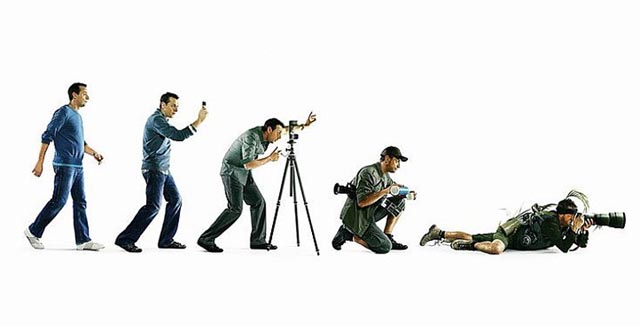
- Evolution of a photographer (via Scott Bourne).
Labels: amazon, apple, backup, birthday, cancer, film, geekery, linksofinterest, music, news, olympics, photography, politics, religion, science, space, television, twitter
27 May 2009
Learn GarageBand from me on DVD
My Quick Start to GarageBand video course from MacVideoTraining (a company co-founded by my former podcasting partner Paul Garay) is now available on DVD:
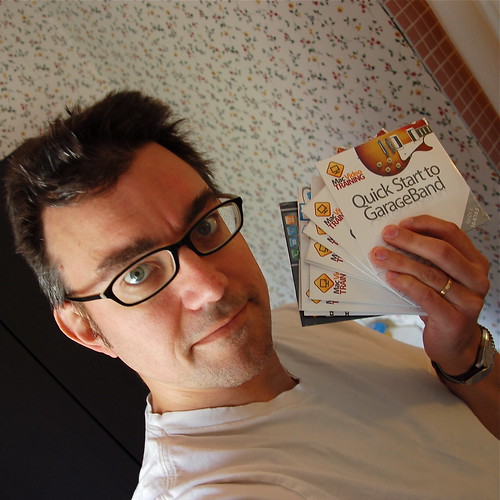
You can get it at London Drugs and many other retailers in North America, or if you use the promo code ihr, you can get a 20% discount if you buy a DVD or download online. The discount code also works for John Biehler's iTunes course and other stuff from MacVideoTraining, including bundles.
Labels: apple, education, insidehomerecording, itunes, paulgaray, recording, software, video
27 April 2009
Worrying about Mac security
Last week's TidBITS has a great set of tips from Rich Mogull to evaluate Mac security claims, as to whether they're worth concern. (Some are.) Not sure how I missed it when it came out, but John Gruber highlighted it. The basic questions:
- Is the Story Based on a Vendor Press Release?
- Is the Story Really New?
- Is the Security Issue Really New?
- What's the Mechanism of Action?
- Does the Story Defend Mac Security Based Solely on History?
While a lot of claims of Mac vulnerabilities, exploits, viruses, and trojans are questionable, Mogull notes that, "The latest version of Windows (Vista, not that most people use it) is provably more secure in the lab than the latest version of Mac OS X 10.5 Leopard."
Incidentally, TidBITS is turning 19 this month—it is one of the very oldest Internet publications that has continued to operate that entire time. It remains a valuable resource for techies in the know. I can't even recall when I first subscribed, but I must be somewhere around 15 years as TidBITS a reader myself.
Labels: apple, controversy, macosx, security, tidbits
21 April 2009
Derek the fanboy
My daughter M and I just calculated that over my computer-using lifetime, I've owned 35 out of the 114 or so models of computers, iPods, and input devices that Apple has released since 1976 that appear in this collage image (via TidBITS). It doesn't list printers and some other accessories, and there are a few missing (I don't see the Apple ][ Plus, Power Mac 7100, or Power Mac G3 desktop, for instance) so I've actually had a few more in my house since 1982.
I guess I fall into the fanboy camp, right? Especially because I could pick out the missing items off the top of my head.
Labels: apple, geekery, linkbait, memories
15 April 2009
Links of interest (2009-04-15):
Most of these come via Jason Kottke or John Gruber:
- Nine science words that came from science fiction. See the (inevitably snipey) comments for some others, like robot, cyberspace, waldo, grok, avatar, and the delightful thagomizer.
- "I can’t think of a way that the entire [computer] desktop metaphor can be overhauled without either everyone in the world switching over at once (which won’t happen), or becoming a 'data island' like the Newton or Classic Mac OS."
- The MythBusters have a regular column in Popular Mechanics.
- "If you're married to page views, never assume that I am. If you're angling for 1,000,000 Twitter followers whom you pretend to read, never assume that I am. And, if your project is based on generating compulsory year-over-year growth vis-a-vis market domination and fiduciary responsibility, never assume that I am."
- Rush Limbaugh's 10 dumbest remarks.
- Stephen Colbert won't get a space station module named after himself, but he will get a space treadmill instead.
- Our pal Kris Krug takes great photographs of people, and is enormously prolific in publishing them online, and Miranda and Reilly Lievers make amazing wedding pictures. But when my other friend Alastair Bird, who's made his living as a photographer for many years, publishes the occasional portrait online, there's something about his shallow-focus work with a medium-format camera that I find just astounding.
- A nice summary by "Bad Astronomer" Phil Plait of Jerry Coyne's book Why Evolution is True.
- I am a photic sneezer, and it runs in my family (my grandmother did it, I think my dad does it, and one of my daughters does too). I'm glad to read an explanation.
Labels: apple, controversy, design, evolution, geekery, humour, language, mythbusters, politics, science
10 April 2009
My review of GarageBand '09
 Over the past year, I've put myself forward as something of an expert on GarageBand, Apple's intro-level audio recording and podcasting application. I've been using the program intensively, through every version upgrade, since it first appeared in 2004, and I've kept in touch with Apple (through both formal and informal channels) about it ever since.
Plus you can now buy a comprehensive video course I recorded to show you how GarageBand works.
So you might wonder what I think of Apple's newest version of the program. If so, I've just published a big GarageBand '09 review article over at the Inside Home Recording blog, which should interest you. There's also a link to my audio review from a couple of weeks ago.
Labels: apple, education, insidehomerecording, music, podcast, recording, review, software
22 March 2009
Get 20% off my GarageBand video course
A few months ago I recorded a big series of more than 50 short instructional videos for the Quick Start to GarageBand course at MacVideoTraining.com, a new video training company co-founded by my former Inside Home Recording (IHR) podcast co-host Paul Garay. Some of their other training DVDs are available at lots of retailers throughout North America.

However, if you want a better deal, you need to do it online. You can buy my course, or one of several others from the company, with a 20% discount on any single video or bundle, through a new affiliate program at IHR. Just go to insidehomerecording.com/mvt and enter the coupon code ihr at checkout.
Labels: apple, education, insidehomerecording, music, podcast, recording
04 February 2009
iLife '09 is worth the upgrade
 If you have a Mac, Apple's $100 Cdn iLife suite of programs is perhaps the best deal in software today. That may be true even if you don't have a Mac, because if you buy one, iLife comes along free—and just a few years ago, the features of any one of its programs would have cost you more than the computer does today. So depending on what you do, it's almost like you're getting the Mac for free instead.
When it first appeared in 2004, for instance, GarageBand inspired me to start recording music again after a long hiatus. iPhoto is an extremely capable photo cataloguing program, and even as a pretty keen photography enthusiast, it's what I use to manage my collection. For me, iMovie, iWeb, and iDVD come along as bonuses.
iDVD is capable enough on the rare occasions I need to make a video DVD. The new versions of iMovie are still pretty weird, in my book, but they work, and I may warm to the new iMovie '09 now that it's improved over the confusing reboot that was iMovie '08. iWeb—well, as a web guy, it's never been my cup of tea, and I gave up on it a few months ago after giving it a good two-year chance to justify its existence. But some people might like it.
iLife '09 is the latest iteration of the package, and I picked it up last week, shortly after it became available in stores. I'll be reviewing the new GarageBand for Inside Home Recording sometime soon, but there are already some other impressions on the web. Jim Dalrymple at Macworld looks at the new guitar-focused changes in GarageBand, Rick LePage examines iPhoto's new emphasis on face recognition and location awareness, and screenwriter John August takes a crack at iMovie '09.
I have to agree with Fraser Speirs that iPhoto's new integration with Facebook and Flickr looks way too heavy-handed. I actually don't want photos, tags, names, and such synchronized between my computer and those sharing sites. Usually, I just want to push photos out from iPhoto, and maybe make changes on the Web, but I don't want those changes propagating back and forth. I often prefer to collect very different sets in the two places, and may need to name people on my computer but not online, for instance. So I don't think I'll be turning those features on, but will use my old methods instead.
In iLife '09, GarageBand makes big changes, especially in new features (like Lessons) that i didn't even know I'd want, while still keeping what makes it great. iPhoto adds extremely cool new stuff that I'll definitely use, and some other stuff I definitely won't. iMovie may have redeemed itself enough that I'll work with it again. iDVD? We'll, it's still there. And iWeb? Despite good progress, it's just not the way I work with websites (I create almost everything in a text editor).
I'm happy with what I've seen from iLife '09 so far. For $100, as always, it's a total steal.
Labels: apple, music, photography, review, software, video
24 January 2009
Sacrilege! Derek installs Windows!
 Back in the fall of 1995, after quitting as a full-time musician, I got a job at a magazine whose entire workflow ran on Microsoft Windows—something that was, and still is, unusual in publishing. I was someone with a long-time geek heritage and a passing familiarity with IBM PCs—as well as Unix, CP/M, and even TRS-80 and mainframe computers—but who had used only Apple II and Mac machines at home for more than a decade. So I figured I'd better get up to speed on Windows before I started the job.
My dad kindly loaned me one of his desktop computers, freshly booted up with Windows 95, which was then current and shiny new. The machine was underpowered, with only the minimum amount of RAM to install Windows 95, but I got the general gist of the operating system, and soon enough was the go-to technology guy at the office for many things. I returned the Windows box to my dad, and we haven't owned anything but Macs in our house ever since—10 or 11 of them over the years (I've lost count). Six are still actively working today.
So this view comes as a bit of a shock:
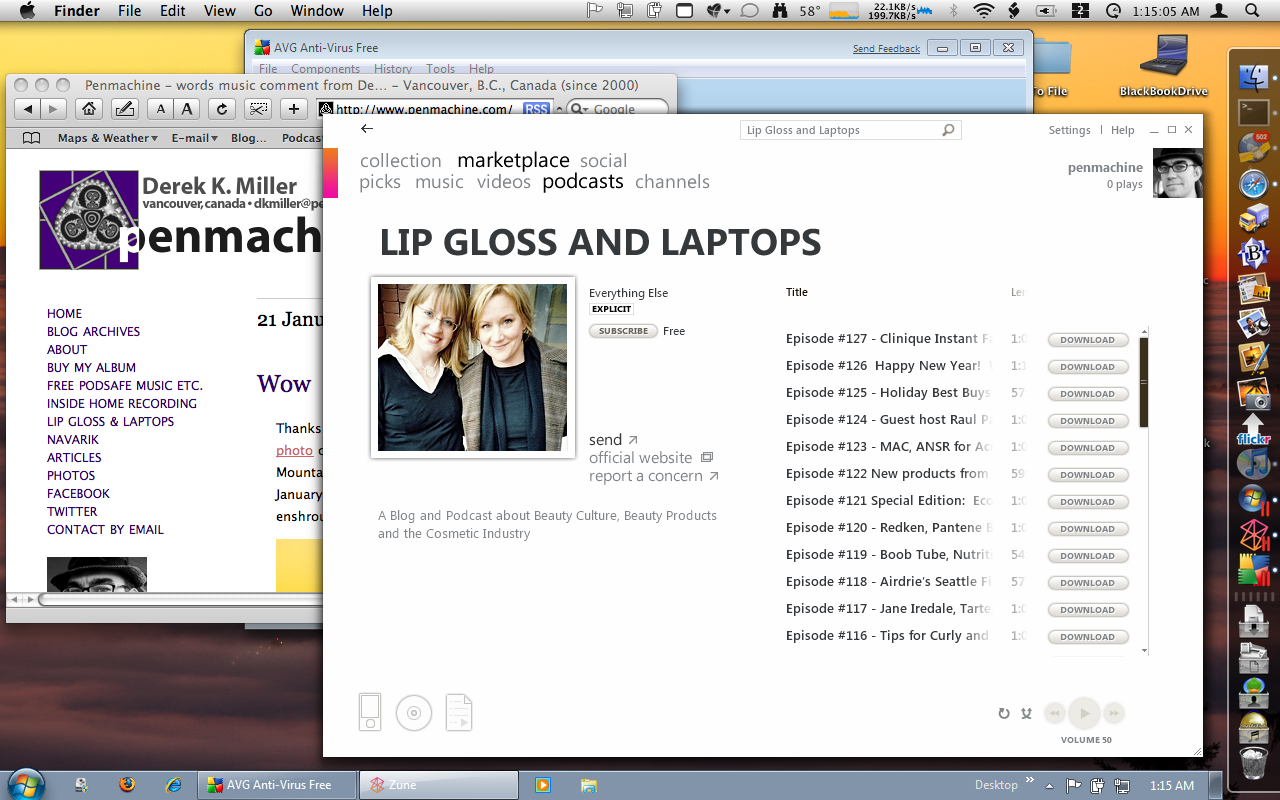
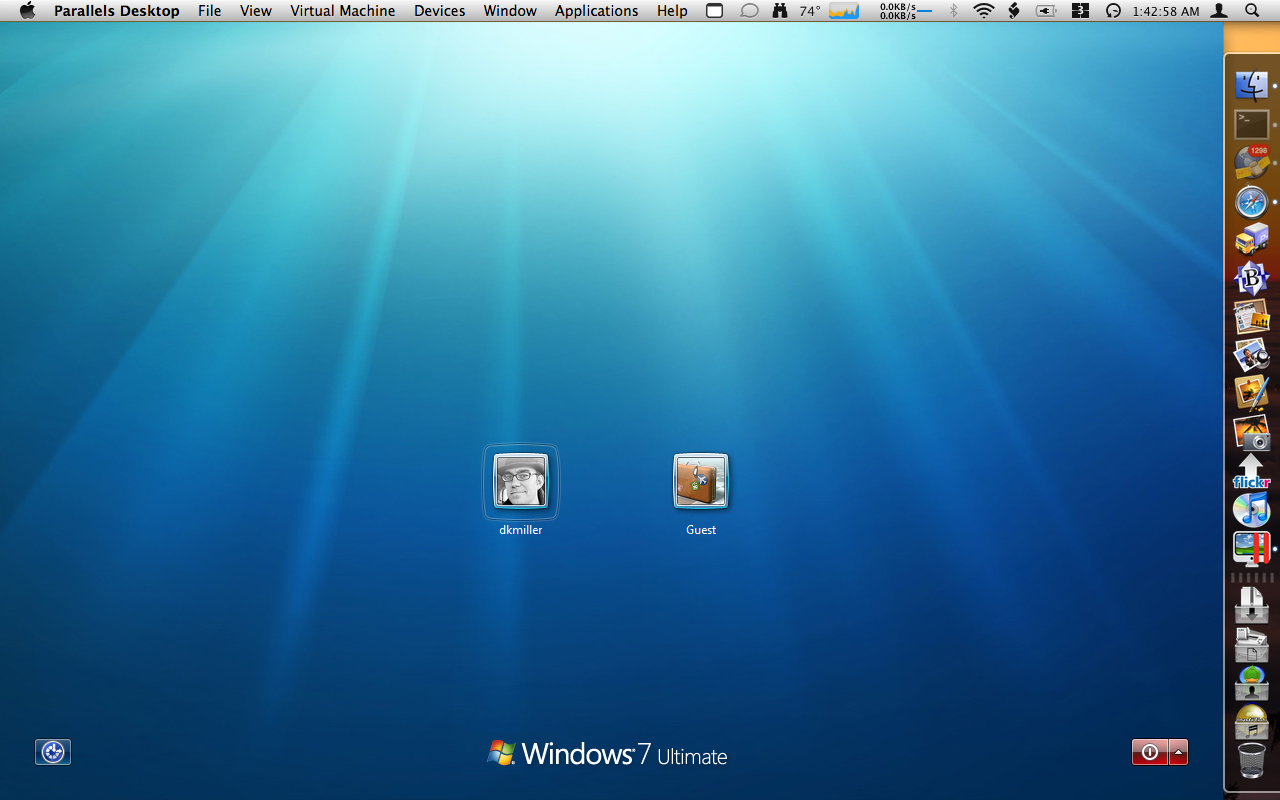
That's the screen of my MacBook, and you can see both native Mac programs (like Safari and the Finder) and native Windows programs (the Zune application and AVG anti-virus) running at the same time. I'm using Parallels Desktop to run both Mac OS X Leopard and the new beta version Windows 7 simultaneously. I can also reboot the MacBook into full native Windows 7 for extra speed and some additional interface eye candy.
Why did I do such a thing, and why install Windows on my Mac on January 22, the 25th anniversary of that famous Mac "1984" ad? Well, mostly because the Windows 7 beta is free (though if you want to get it, today is supposedly the last day), and it will work until August. I wanted to see how the new version is shaping up.
Because, honestly, I was falling a bit behind. After that magazine job, I worked at a Windows software developer for almost five years using Windows 98 and NT 4, then as a freelance technical writer working with NT 4 and Windows 2000. I only had a Windows laptop briefly when I first started at Navarik in 2003, then went Mac at work again. I never really did much with Windows XP, and I'm not sure I ever used Windows Vista at all myself, though I've seen others use it. As I said, our home was a Mac zone the whole time.
I needn't have worried. Windows 7 is a tweaked, improved, more secure version of Windows with better fit and finish, but it's still Windows. The Taskbar and Start menu and Windows Explorer are still there. So is the dreaded Registry Editor. As a listener to the Windows Weekly podcast since it began in 2006 (hey, I should listen, since I wrote the theme music—on a Mac), I knew how to get the beta version working best for me, and what to install for best results (Windows Live Essentials and Live Mesh, for instance).
In this new Internet age, with Macs more popular then ever, I have less reason than I did in 1995 to run Windows. But I like to keep current, and it's a bit of a thrill to see my MacBook boot up Windows like a real PC. Ahem.
Labels: apple, geekery, macosx, memories, software, windows, windows7
12 January 2009
Opening up music
 Since the early days of this blog, I've written about how I dislike copy prevention technologies for software, music, and movies—and have hated them since my early days of computer use more than 25 years ago. That's because it's never wise to treat your customers as your enemies.
Today, crusading Canadian copyright lawyer and professor Michael Geist writes about how finally, slowly (at least for music), the big companies might be getting it. Until 2008, the recording industry was intent on suing file sharers, locking files with DRM copy prevention, and pushing through crummy copyright legislation. Now:
The decision to drop the lawsuit strategy was long overdue as it had accomplished little more than engender significant animosity toward the industry [and] helped to convince some of Canada's best-known artists to speak out against the practice.
[...]
Apple, the dominant online music seller, announced that it will soon offer millions of songs from all four major record labels without digital locks [which] reflects the recognition that frustrating consumers with unnecessary restrictions is not a particularly good business model.
[...]
In addition to the privacy, security, and consumer concerns with such legislation, laws to protect digital locks seem increasingly unnecessary given the decision to abandon their use in the primary digital sales channel.
I don't know if these changes mean that the recording industry is figuring out effective ways to do business in the Internet file-sharing world, or whether it is just giving up on failed strategies, but I find the trend encouraging. In practical terms, it means that, with six functioning computers for four people in this house, we won't have to worry too much about iTunes letting songs purchased from the iTunes Store play on only five computers anymore.
Alas, movies, audiobooks, and such are another story entirely.
Labels: apple, canada, controversy, copyright, itunes, music
27 December 2008
What to do with your old iPod(s)
 Here's a list we're starting to need in our household, since the girls got new iPods this month, and my wife and I are each on our second or third:
- Lifehacker - Top 10 ways to repurpose your old iPod (via TUAW)
Options include using it as a virtual flash card deck for speech notes, or to run a presentation, holding reference information, as a backup drive, and for booting Windows XP (!). Or, as TUAW suggests, you can give it to a friend or family member, keep it as a car unit, or, as I have done, load it up with background music for Christmas (or for intermissions for the band).
I may try to use the old iPod nano as a Mac boot disk, even though that's not supposed to work. It can't hurt to try.
Labels: apple, family, geekery, ipod
21 December 2008
Free MP3 song: "Vitamin Yummy"
When I put together the GarageBand video course that Mac Video Training is now selling, I of course had to construct a song using the program. I had no plan in advance, so as I worked my way through the various videos the tune sort of assembled itself into a weird little song I ended up calling "Vitamin Yummy" (3 MB MP3 file):
- Download "Vitamin Yummy" (2 min 30 sec)
It's silly, and I'm not even sure what style to call it, but there you go. As usual, it's available under a Creative Commons license so you can share it around. I'm also not sure if this song qualifies for the Miss604 iTunes Giveaway either, but I'll enter it anyway.
Labels: apple, free, guitar, insidehomerecording, music, penmachinepodcast, software, video
18 December 2008
Last IHR of 2008, GarageBand training, mention at TidBITS
 Those of you who listened to my classical guitar recording of "What Child Is This?" yesterday might be interested in how I recorded it. I describe that in episode #65 of Inside Home Recording (IHR), our last one for the year. My bit starts about 36 minutes in, but there's lots of interesting stuff in the rest of the show too.
On a similar instructional note, over the course of several weeks this fall, when I was feeling well enough, I recorded almost 60 short instructional videos about how to use Apple's GarageBand audio software. They now form the Quick Start to GarageBand '08 course from Mac Video Training, a company co-founded this year by my former IHR co-host Paul Garay and Mike Kaye from Switching to Mac. The complete course costs $30 USD (about $40 Cdn these days) for download, and will be available on DVD in stores in the new year. (Earlier DVDs by different instructors are already at shops like London Drugs.)
Here's the introductory video:
Finally, the fine folks at TidBITS, a Mac-focused online newsletter that's been publishing since before the Web was invented (really!), have highlighted my Camera Works series here on some technical aspects of cameras and photography. I've written for TidBITS in the past, and it's a great resource you should all subscribe to. I can't even remember how long I've been reading it, but every issue teaches me something.
Labels: apple, guitar, insidehomerecording, paulgaray, photography, software, tidbits, video
12 November 2008
"Pepper Plant" and "Spokesmodel Six Eight," my two new songs, plus the archive
For the past two and half years, I've been using Apple's iWeb to publish my Penmachine Podcast of original free MP3 music, interviews, and such. It's always been a pain to use, especially when the files aren't hosted on Apple's .Mac/MobileMe service (which mine aren't), but I kept working with it out of inertia and because it was worth knowing how iWeb works, as well as because I don't update that podcast very often anyway.
But earlier this year, Apple went and broke iWeb for podcasting, and seems in no hurry to fix it. So while I figure out how to migrate my podcast over to some other platform (probably WordPress, but we'll see), I'm just going to post the two new songs I have for it here. I'll add them to the Podsafe Music Network soon too.
New songs
Each link goes directly to the MP3 file for the song, so right-click or control-click to download it instead of playing it in your browser. Unless noted otherwise, all MP3s linked from this post are available under a Creative Commons Attribution 2.5 license. Use them as podcast theme music, backgrounds, or remix them, or whatever—just give me credit:
- "Pepper Plant" (4.3 MB MP3 file) - Of course I've been working on new songs and speaking and going on the radio since March, but I've been too lazy to update the podcast. No more. Here is "Pepper Plant", an instrumental tune I finished in October 2007, but thought I would add to, or at least remix. Yet somehow I never did. Listening to it again, it sounds just fine, so I figured I'd post it up. I'd describe it as something like an old Booker T and the MGs instrumental tune, though not quite as groovy. Give it a listen and see what you think.
- "Spokesmodel Six Eight" (2.9 MB MP3 file) - Earlier in 2008, I borrowed a set of MIDI electronic drums from our friends KA, Jeff, and Clive. "Spokesmodel Six Eight" emerged from using that kit: its name comes from the 6/8 time signature I chose to play it in, since that's something not easy to find in the built-in drum loops for GarageBand. It's another track I expected to finish off, polish, and remix at some point, because it's nothing but drums and some guitars. No bass, no keyboards, no vocals, hardly any arrangement there at all. But it doesn't need more than that, and I particularly like the sounds of the guitars I managed to obtain. So rock out with it.
Old songs
As a bonus, here are all the free MP3 songs (again, mostly instrumental) I've published to the podcast since I started in 2004, in semi-alphabetical order. Tracks with an asterisk * are also available on my album Penmachine Sessions from 2005:
- All Blues Jam with Doug Kaye and Dave Dederer (not Creative Commons, all rights reserved)
- Alpaca Cheese
- Amarilli Mia Bella by Simon James
- The Burning Moon with Simon James*
- Camp Walk
- Can You Dig It? - Business Jive theme
- Clouds or Smoke?*
- Cold Cloth and an Ice Pack*
- Comcast Connection Blues - words by Chris Pirillo
- Deep Cycle Discharge with Simon James*
- El Campo
- Fakeout
- The Flu Song Medley from my band in 1994 (Creative Commons Music Sharing license)
- Fresh Snow in the Valley*
- Funkly Dougietude with Doug Elliott
- Gronk Patrol*
- Had a Plan, Had to Change It*
- Hotcake Syrup*
- How Tall Jennifer Is*
- In the Hollow - Stars Hollow Podcast theme
- It Wouldn't Hurt - 2001 demo
- Less Red Than Red - now the theme for Windows Weekly
- More Red Than Red
- Marina Bay (original master)
- Marina Bay (remaster)
- Meltdown Man* - appearing in the documentary film Paper or Plastic?
- Mighty Mullane (full version)
- Mighty Mullane (short version)
- Pirilloponzi with Chris and Ponzi Pirillo* (Creative Commons Music Sharing license)
- P and P
- Pissed Off Adam Curry (full version)
- Pissed Off Adam Curry (short version)
- A Pizza Without Time
- Pocketbook*
- Quick 'n' Dirty Drums - released to the public domain
- Stop Yield Go Merge*
- Stop Yield Go Merge (Les Thorn remix)
- Striking Silver - 12 minutes!
- Take Time for the Tub
- Tell Me About Gnomedex (full version)
- Tell Me About Gnomedex (instrumental version)
- Tell Me About Gnomedex (karaoke version)
- That's No Dream*
- Washing Off Like an Aardvark (full version) - later the theme for The Planet TV Show
- Washing Off Like an Aardvark (short version)
- Washing Off Like an Aardvark (shorter version)
- Washing Off Like an Aardvark (stub version)
- We Three Kings - Christmas tune
- You're the Big Sky (vocal version)
- You're the Big Sky (instrumental)
Labels: apple, free, itunes, music, penmachinepodcast, podcast
06 November 2008
Audio of my CBC interview
If you missed my interview on CBC Radio earlier today, I have an MP3 file of it available now (5.2 MB, about 12 minutes). I spoke with host Stephen Quinn about all the drastic stuff I've been through since June 2007, including my major surgeries and several chemotherapy regimes, as well as the new phase of my cancer treatment, that of living with the disease rather than simply trying to destroy it.
Incidentally, I had intended on publishing the audio to my Penmachine Podcast too, but Apple's iWeb software, which I use for that, has a nasty bug that's been around since April, and which doesn't seem any closer to being fixed. It prevents me from updating the podcast without a lot of extra work, so I think I'll just plan to switch over to a less awkward podcasting tool in the near future. I'll let you know when that happens—and I'll have some new original music to post there too.
Finally, a new episode of Inside Home Recording should be online tomorrow too.
Labels: apple, cancer, cbc, ego, insidehomerecording, podcast, radio, software, web
29 July 2008
The purple E! The purple E!
I'm not sure I'm entirely comfortable supporting the TMZ paparazzi (a woman near the end of the video calls them "vultures"), but it's refreshing to see a celebrity like John Mayer have just as much trouble doing family phone tech support as the rest of us:
Via Dan "No Longer Fake Steve" Lyons.
Labels: apple, music, techsupport, video, youtube
11 July 2008
iPod Touch + iTunes Store = FailPod
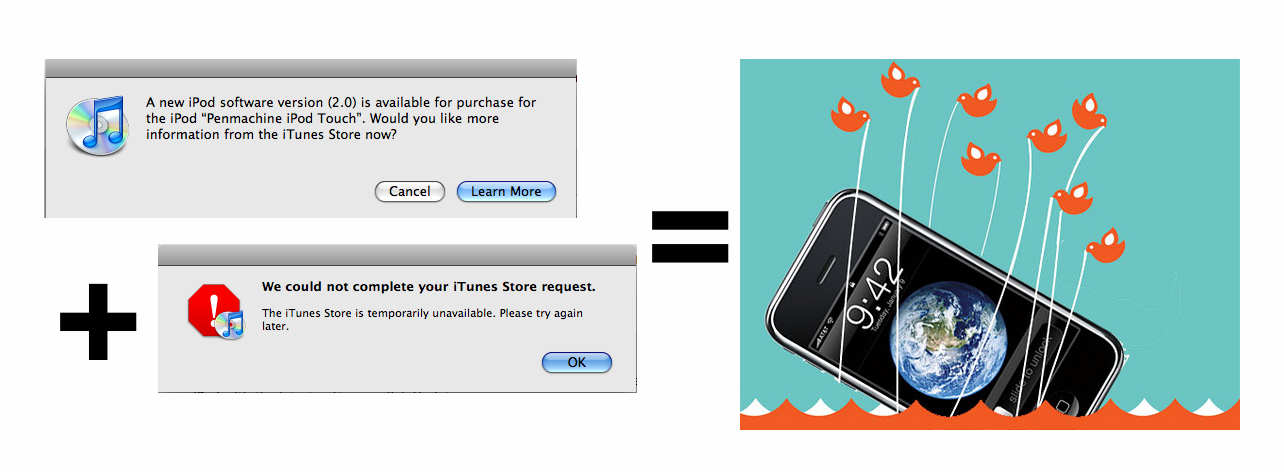
Looks like it's been a fun day in iPhone/iPod Touch land. And no, I don't plan to get an iPhone, and didn't get in line, but I did try to update my iPod Touch, without success.
Labels: apple, iphone, ipod, vancouver
02 June 2008
The hard drive grumblies
A few weeks ago, I replaced the old wireless router in our upstairs den with a new Apple AirPort Extreme base station, which has generally worked great. One extra benefit of the design is that, like Apple's similar Time Capsule, I can use it as a wireless backup device device by hooking up an external USB hard disk, like this:
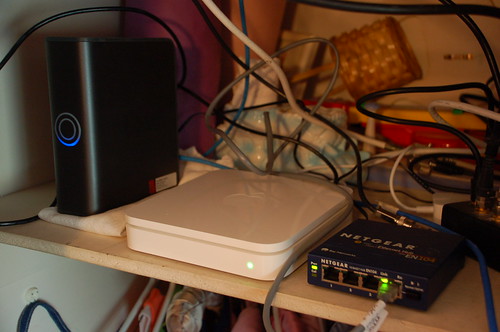
The disk I use is a 500 GB Western Digital MyBook, perched to the left of the base station itself. If you look closely at the photo, you'll notice that the disk enclosure is sitting on a folded cloth napkin.
Here's why. The shelf all that networking gear sits on is made of light wood, and sits loosely on a wooden lip around the edges of the inside of the den closet. The other side of the closet's back wall is the south wall of our bedroom.
So, after I set up automatic backups for our various Macs using Time Machine and other tools (apparently not officially supported in this setup, by the way!), whenever the hard drive was active (especially at night), our bedroom wall would rumble disconcertingly as the disk mechanism chugged away. The shelf and the closet drywall were acting as a big soundbox amplifier.
And so, the napkin, my half-baked attempt to damp down the vibrations from the disk mechanism. It sort of works. Now, when the drive is active, the wall makes something more akin to subtle stomach-growling noises, rather than louder rumbling. During the day, that's fine, but at night it's still prone to keeping us awake.
The temporary solution has been to make sure backups occur during the day when it doesn't bother anyone. But I still must unhook the USB drive at night to avoid the grumblies, during what seem to be random administrative disk accesses (perhaps search indexing) that occur anyway from time to time. But I'd rather not do that. I'm considering putting some foam under the edges of the shelf itself, or maybe moving the whole setup to different, less resonant part of the closet.
Wow, this sure is a first world problem.
Labels: apple, backup, geekery
27 May 2008
Shopping out
 Without my wife, it's unlikely I would dress well. The evidence is clear from what I looked like before we met. However, I've always liked shopping, and used to enjoy going to the mall with my mom as much as 30 years ago. I just wasn't fond of buying clothes.
That's no longer true, and for the past couple of days I've spent some of my free time refreshing my wardrobe for the summer, with new shirts, sandals, and trousers.
I also got the chance to do a couple of other things. One was to purge out some older stuff in my clothes cupboards. The other was to go downtown and check out the new Apple Store.
Yeah, it is pretty much the same as other Apple Stores I've been to, with much the same selection of products as other Apple resellers in town, just more slickly presented. However, if you're looking for a variety of FireWire external hard disks (rather than USB 2.0 versions), the Apple Store has more types than most.
Labels: apple, clothing, family, geekery, shopping
24 May 2008
Apple Store Vancouver is open
I didn't go when the Apple Store Pacific Centre opened today in Vancouver, but John Biehler did, along with a gaggle of other Vancouver webby types. As expected, it was pretty busy:

It's nice to have a location here in Vancouver, finally, but since all the mall Apple Stores look pretty much the same...

....then if you've been to some of the others (I've been to three of them near Seattle, and one in Hawaii), I don't know how much will be new about this one.
Labels: apple, geekery, shopping, vancouver
21 May 2008
Links of interest (2008-05-21):
Chemo day today, so I'm in bed as usual, with Iron Chef America coming up in an hour. Some links:
- "Asperger's Syndrome has been a part of IT for as long as there's been IT. So why aren't we doing better by the Aspies among us?" (Via Tim Bray.)
- Finally! Apple Store Vancouver will open Saturday, May 24.
- Hancock may be the first original blockbuster movie idea in a long time—and it still has Will Smith! Nevertheless, I expect the new Indiana Jones opening on Thursday to be better, although there is blessedly very little original about it.
- While I've long thought the One Laptop Per Child (OLPC) project was a neat idea, I've also long had a sinking feeling that the people who put it together didn't really have a plan to make it work, especially once the computers were out in the field. It seems that may be true, according to the project's former director of security architecture (via Fake Steve), who writes, "now the company has half a million laptops in the wild, with no one even pretending to be officially in charge of deployment."
Labels: apple, biology, geekery, linksofinterest, movie, olpc, vancouver
20 May 2008
Wheels within wheels
I used to teach courses about Microsoft Word. Stuff like this (via John Gruber) is what made me stop.
Labels: apple, macosx, microsoft, publicspeaking, software
15 May 2008
Other stuff
 I took in my old broken MacBook power adapter yesterday, and unfortunately Apple requires that the dealer keep it while they wait for the replacement. That means I temporarily have no way to charge my laptop, so I have to ration its time for when I really need it.
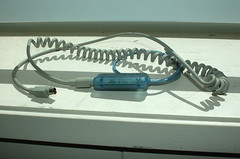
So I find myself spending much less time randomly surfing around. Instead, I've been following up my recent finishing of Walter Isaacson's Einstein with James Gleick's Genius, a biography of perhaps the 20th century's second-greatest physicist, Richard Feynman. Plus I finally got my Griffin iMate USB-ADB adapter and hooked up one of my Apple Extended Keyboard IIs, as well as the accompanying Apple Desktop Bus Mouse II.
I'd forgotten that even the old ADB Mouse II, despite its physical mouse ball instead of a modern LED or laser, feels very nice too. The shape of the mouse feels better in my hand than Apple's new Mighty Mouse and most third-party mice, the plastic is solid, and the single-button mouse click is great. While I miss the right-click and scroll ball, I may even keep using the old ADB mouse. I'll certainly keep going with the great old keyboard.
Labels: apple, books, geekery, repairs, usb
14 May 2008
What sucks about Apple's MagSafe power adapter
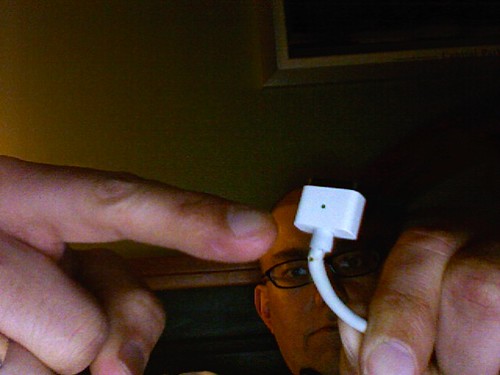
It's been nearly a year since anything went wrong with my MacBook laptop, but overall, it hasn't been a paragon of reliability. The battery, motherboard, fan, DVD drive, and hard disk have all (!) needed service. Now there's this:
UPDATE: It looks like AppleCare will replace the adapter for me, no charge. I'm taking the old one in to a local Apple dealer today.
Right from when it was announced in 2006, I thought the MagSafe power connector, which pops out if you trip over the cord rather than dragging your laptop to the ground, was a smart idea. But the sharp angles and minimal strain relief of the design also seemed fragile to me, and I appear to have been right. I know several people whose MagSafe adapters have failed exactly as mine is: the cord wears through right next to the computer end of the connector.
Conversely, my wife's round iBook connector continues to work just great, even though it is a year older, and it's rare to hear of those adapters failing in a similar way at all. The new MagSafe design for the MacBook Air seems like it might be sturdier, but I don't think the actual power brick is rated for enough voltage for my bigger MacBook.
The pity is, because Apple has patented the MagSafe design and has not licensed it to other manufacturers, you can't buy yourself a third-party MagSafe-compatible power adapter with a better connector. So whether AppleCare warranty covers it or not, I'll end up with a similar flawed design, which may fail on me again in a year or two.
Labels: apple, design, macbook, repairs
02 May 2008
Metal, wood, and plastic
The Heinz Nixdorf MuseumsForum in Paderborn, Germany, bills itself as the world's largest computer museum. James Harton at Flickr has some photos of key elements of the collection, which include old typewriters and an Enigma machine.
Labels: apple, encryption, geekery, retro, travel
30 April 2008
Keyboard nerdery: the Apple Extended Keyboard II and IBM 101
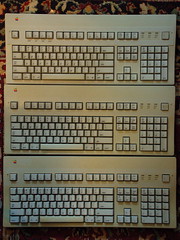 Almost five years ago, I wrote about my favourite keyboards. Alas, things have changed somewhat: most of the links in my original post are broken, and Apple has stopped making the old transparent black-keyed Pro Keyboard and now produces some interesting but very different super-thin models instead (in between, the company made a tolerable but ho-hum white keyboard that also acted as an excellent crumb tray).
This week, John Gruber and Dan Benjamin wax rhapsodic on their podcast about the ancient Apple Extended Keyboard II, pictured. I have three, as well as two Apple Keyboards (not the Keyboard II) that use the same keys, several miscellaneous USB keyboards, a decent basic PC PS/2 keyboard, and a treasured IBM 101. The 101 is currently hooked up to my eMac with a PS/2-USB adapter, with keys remapped with the Mac's System Preferences.
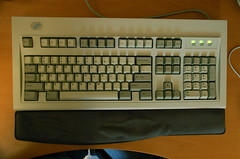 The Extended Keyboard II and the IBM 101 are the twin holy grails of keyboard nerds. Unfortunately, my EKIIs have been sitting in a cupboard for years because I never got around to buying an adapter to make their Apple Desktop Bus (ADB) connectors work with newer USB Macs. But now Gruber and Benjamin may have inspired me to track one down.
I spent many a year pounding my fingers on an Extended II, in university and as a freelance technical writer. The IBM 101 is a very different beast, also built like a tank but with a more metallic, punchy feel, and an audible note to its astoundingly loud typing sound. As yet no one has been able to replicate what's good about these devices, so if you're a serious computer typist, you'll need to track down a vintage one.
And no, you can't have mine.
Labels: apple, geekery, history, podcast
29 April 2008
iPhone coming to Canada, says Rogers
Well, here we go.
No details on pricing or plans, of course.
Labels: apple, iphone, telecommunications
27 April 2008
Time for a new Wi-Fi router
UPDATE: Yup, the AirPort Extreme Base Station worked like a charm. Back to normal now.
Evidence indicates that it is indeed our wireless router at fault for the slug-like behaviour of the Wi-Fi networking in our house. I think this will be a good excuse to purge the ungainly stack of networking gear...
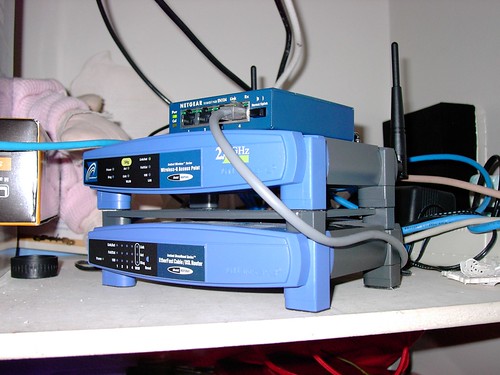
...and replace it with a single wireless router that can do everything with fewer wires and, with luck, less general flakiness. Some of that stuff is only 10BaseT or 10Base2 speed, and has been blinking away in our den closet for a decade.
Labels: apple, geekery, techsupport, web
26 April 2008
Argh argh argh
Our Internet connection has been painfully slow at home for the past few days. Or so I thought. It turns out that the hardwired connections (like the ancient iMac in the kitchen) are just fine, but the wireless network is behaving very oddly: uploads from our computers to the Net are speedy, downloads crawl. Unfortunately, most stuff (email, web, podcasts) requires downloading more than uploading.
I've tried restarting the AirPort Express that serves as our base station. It shows full bars for signal strength, so that's not a problem. I've tried disconnecting it and hooking up the old flaky Linksys base station—which was still flaky. I've changed the AirPort Express wireless channel, gone to 802.11g only (instead of mixed b/g), turned on Interference Robustness, increased the multicast rate, and so on.
Next I'm going to reset the firmware on the base station. If that doesn't work, I'll see if turning off network encryption, or changing the encryption type, makes a difference. In the meantime, we're mooching off a neighbour's NETGEAR router, which is (strangely) sometimes locked down and sometimes not.
Any other suggestions? This setup has been fine for months and months, so why it's suddenly gooping like molasses I have no idea. Networking remains voodoo, I tell ya.
Labels: apple, geekery, techsupport, web
25 April 2008
I still think profit beats market share
Way back last decade, in 1999, before this website was even a blog, I wrote an article for MyMac magazine called "Why the Obsession With Market Share?" that said, in part:
Market share alone is pretty meaningless. If Apple can manufacture, market, and sell each of its computers at a profit, then whether it has 2% of 15% of the market doesn't matter at all to whether the company is financially healthy.
[...]
Increased market share is a symptom of those results, not the result itself. Keep that in mind the next time a pundit spouts off about Apple's market share -- whether it's rising or dropping -- or when you're tempted to talk about it yourself.
What counts is selling computers and making money doing it, so that Apple Computer will still be around -- to give us Mac users something to buy, and make money doing it -- years down the road.
This week John Gruber makes a similar point. Replace my old mentions of IBM, Compaq, Power Mac G3s, and iBooks with Dell, Motorola, iPods, iPhones, and MacBooks, and you can say plus ça change, plus c'est la même chose.
Labels: apple, debate, geekery, history, money
16 March 2008
Learn home recording at IHR TV
 My Inside Home Recording podcast co-host Paul has been making instructional videos for macProVideo.com for some time now, and he's good at it. So when he proposed that we start putting out short video podcasts in addition to our regular audio show, I knew they could be useful.
Now we've posted our first episode of Inside Home Recording TV (IHR TV). This one Paul recorded entirely himself. It's about using Propellerhead's ReWire to link their Reason software to Apple's Logic Pro.
We're trying something new with this video podcast. As usual, you can subscribe to watch on your computer, Apple TV, iPod, Zune, or whatever. In addition to posting it on our own site, you can also find each episode free at the video sharing sites Revver, Vimeo, Blip.tv, and YouTube. Plus we post them to Facebook, and will note each new show (audio and video) at Twitter.
Labels: apple, insidehomerecording, paulgaray, podcast, video
Wacky wireless
I'm posting this from my iPod Touch on a bench at the playground at my kids' school. They are riding bikes. Yay for free open Wi-Fi from one of the nearby apartments.
Labels: apple, family, geekery, ipod, school
09 March 2008
Links of interest (2008-03-09):
- "You call this traveling? Twenty-one days, 15 countries, 45,000 miles—without setting foot outdoors."
- "The more affluent a country gets, the more things parents come to see as essential for raising children [so] as long as the world keeps creeping out of poverty, families will continue to shrink."
- jamNOW lets you jam online with other musicians, interact with fans, and listen to live streams from nightclubs all over the place. Haven't tried it, so I'm not sure how well it works.
- Looks like the iMac DV in our kitchen is finally officially obsolete. It's slow, but it still works pretty well.
- Are things really this bad for biology teachers in significant portions of the U.S.A.?
- "If all you do is work, your value judgements are unlikely to be sound."
- "I rejoice in this life that I have, and in the grandeur of a world that preceded me, and an earth that will abide without me."
- "Studies have shown that abstinence-only education does virtually nothing to prevent kids from having sex [and that] abstinence-only group[s] used birth control less frequently."
- "When I get a resume, the first thing I do is type the person's name into Google. If nothing comes up, I trash the resume without reading it."
- "I don't want my ISP looking at how I use the Internet to target ads to me, period, any more than I want the phone company listening in on my conversations in order to sell me stuff."
- TripIt looks like one of the best online travel resources out there, though I haven't tried it.
- How to make your website or blog faster.
- The Universe is 13.73 billion years old, give or take only about 120 million years. Now that is a cool finding.
Labels: apple, astronomy, evolution, family, google, linksofinterest, music, school, science, sex, space, travel, web
30 January 2008
Links of interest (2008-01-30):
A bunch of stuff I've been accumulating over the past few months:
- Types of coffee beverages
- U.S. regional pizza styles
- Build your own Apple Store
- Google Maps mashup of how Greater Vancouver would be flooded by a 4-metre sea level rise (move around to check out your own area nearly anywhere in the world)
- J Allard's thoughts on the first year of the Zune
- Very useful Cascading Style Sheets (CSS) reference for web developers
- How well does restoring from Apple's new Time Machine backup work?
- Intro to Fully Flared features slo-mo skateboarding, explosions
- When you post to your blog, where does the information go?
- Tips to give presentations more like Steve Jobs
- What other sites are on your shared web server?
- How Microsoft would reveal it hasn't done its homework in school (see?)
- New Apple instructional videos
- Long Radiohead video that features all the songs on In Rainbows
Labels: apple, backup, band, blog, environment, extremesports, food, google, linksofinterest, macosx, microsoft, music, publicspeaking, web
24 January 2008
Apple's flops
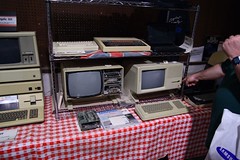 Wired has a nice list of Apple's most notorious flops, including the Newton, the Macintosh TV, and the Lisa.
It's a short, decent list, but I'd argue that the Apple IIc was actually reasonably successful; why they didn't list the disastrous Apple III (or the thermal-paper SilenType printer that went with it) in its place, I don't know. Maybe the Apple III was so bad that Wired blocked it from memory.
Or PowerCD, anyone?
Labels: apple, gadgets, geekery, history
21 January 2008
Logitech's mm50 speakers may be discontinued, but they're still good
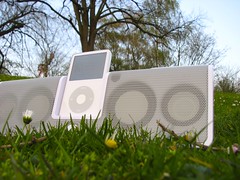 A few days ago my wife mused that she'd like something by her bedside to listen to podcasts and music on, so she doesn't have to go to sleep wearing earphones. Gadgety guy that I am, today I went out and found her just such a thing, the Logitech mm50 iPod speaker system. While it has been superseded by Logitech's newer and very similar Pure-Fi Anywhere system, the mm50 is still widely available (for now) in the $100 to $150 range, brand new.
I've had my eye on the mm50 since Adam Curry advertised it on his Daily Source Code podcast a couple of years ago. For our needs it's the right mix of reasonable size (it's about the length of a loaf of bread, and as deep as a thick slice), portability, ease of use, and, most of all, sound quality. The unit I bought was a discounted open-box floor demo from Best Buy, and while there I compared it to a variety of other options. It sounded superior to most of them, and better than pretty much anything in the sub-$200 category, including its newer Pure-Fi sibling.
It's not perfect. While it charges any iPod plugged into its dock connector, and includes adapters for several iPod models, the mm50 doesn't act as a true iPod dock that you can connect to your computer to sync up. (Earlier releases of the mm50 did offer that feature, and it's still noted in the manual, but newer revisions like ours don't have the necessary pass-through dock socket.) Volume control is two buttons, rather than a more sensible knob. There's no bass or treble or other equalization control—although the sound is so good those don't seem necessary, and not having them keeps down the button clutter. The included remote, while useful, doesn't offer as much iPod control as some competing models. The internal battery isn't easily replaceable.
But the mm50 supports both AC power and its internal rechargeable battery, includes a nice zippered and padded carrying case, has smart stabilizing fold-out metal feet, features a regular 1/8" stereo line input for non-iPod devices, and feels remarkably sturdy. There's a two-year warranty. The "3D surround sound" isn't really 3D, but it sounds shockingly good regardless.
I think the mm50 is a good value, especially if you can find it at a reduced price now that it's a discontinued model. My wife sure likes hers.
Labels: apple, audio, family, gadgets, ipod, logitech, podcast, shopping