Penmachine
18 March 2009
Camera Works: image stabilization (VR, IS, and SR)
 I just acquired my first stabilized camera lens, and I'm impressed so far, especially because it didn't cost me anything. Here's the story.
Sent for service
Last year I had my relatively new Nikon 18-135 mm zoom lens (designed for the D80 SLR, but bought for my D50) repaired under warranty, after the autofocus became unreliable and the lens housing felt loose. Unfortunately, Nikon's low-end lenses don't seem to stand up especially well to the usual wear and tear of enthusiastic use, because recently I had the same problem again with the same lens: unreliable autofocus and loose feel with the lens mounted on my camera, less than a year after the repair.
(By the way, I have a couple of much older but higher-end Nikon lenses that continue to work flawlessly despite their advanced age and considerable use. The problem is either with the company's more cheaply made lenses or with the particular one I owned.)
Anyway, the lens is covered by Nikon's excellent five-year warranty. So once I sent the zoom in for its second repair, Nikon had a look at it and decided to send me a replacement instead: the newer 18-105 mm VR zoom, introduced with the new D90 SLR a few months ago. While it doesn't zoom in quite as far, the newer lens includes Nikon's vibration reduction system—that's what the VR stands for.
What is vibration reduction?
What Nikon calls vibration reduction (VR), other camera makers call image stabilization (IS) or shake reduction (SR).They're all the same thing. Vibration reduction is a new technology, emerging in commercially available optical devices only in the last ten years. It can be built into the lens (as Nikon and Canon do) or the camera body (as Sony and Pentax do), but both work basically the same way: motion sensors detect the tiny shaky movements you make when hand-holding a camera and compensate for them by moving lens elements (Nikon, Canon) or the camera sensor (Sony, Pentax) with tiny motors.
At slow shutter speeds or long focal lengths, that reduces shake-induced blur in your photos. The technology doesn't make moving subjects (people, vehicles, animals) less blurry, because it can only compensate for things that make the camera vibrate.
The results
But within its limitations, VR works quite well. Take a look:
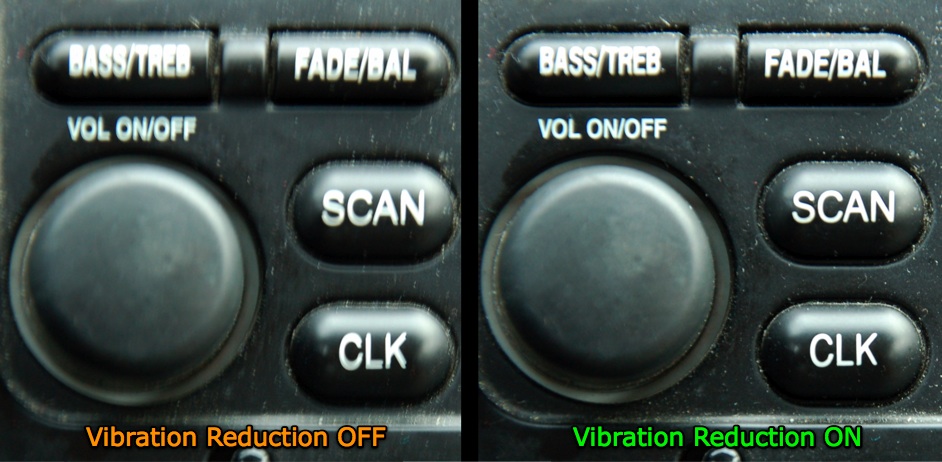
When using VR, looking through the viewfinder can be a bit strange, because the image you see is steadier than your hands. It's even more noticeable on my dad's image-stabilized binoculars, which magnify the image quite a bit more than my zoom lens, and stabilize both eyepieces. You can feel your hands shaking quite a bit as you look through them, but the image moves in a much more "damped" manner.
The result is great, because both in a camera and through binoculars, you can see more clearly when VR is on. And when you take photos of stationary subjects, you can shoot with shutter speeds one or two stops slower (i.e. taking in only 25% as much light, maybe even less) and still get decently sharp pictures.
It's not the same as having a lens with a wider maximum aperture, or a camera with better low-light sensitivity (ISO), but it's another tool to help make better images.
Labels: cameraworks, geekery, nikon, photography, repairs
05 March 2009
A lightswitch dimmer that fits in the old slot
Inspired by the halogen lights in the hotel rooms we visited last week, my wife and I bought some inexpensive new light fixtures for our kitchen yesterday. Even after swapping the bulbs for lower-wattage versions, we discovered that they can be pretty bright. So today I tracked down a clever dimmer switch, the first of its kind I've seen:
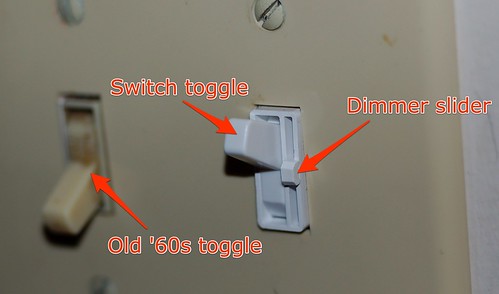
The switch fits in a regular old-style wall plate, the kind we've had throughout our house since it was built in the 1960s. The main toggle is slightly narrower than usual, and operates the regular way. Next to it is a tiny, thin, fingernail-operated slider that operates the dimmer. Neat.
Whenever we repair or repaint something in the house, it becomes suddenly obvious how old and dirty some of the unchanged stuff is. In this case, the beige old wall plate and switch make it clear not only how not white they are, but how grimy the switch itself is after over 40 years of use. Ew.
Labels: home, homedepot, repairs
10 November 2008
Treatments and repairs
A few weeks ago I was contemplating skipping my next clinical trial of cancer treatments, but after talking to my doctors it seems that the drug under examination, cediranib, has a better potential for being effective, and is less likely to cause nasty side effects, than I thought. So today I took my first dose, in the form of a tiny pill no bigger than a small vitamin tablet. I only down one a day, quite a contrast to the several hours of IV dosing from my previous chemo treatments.
It almost seems like too little to do anything, but I've learned over the past couple of years that little things can have big effects in cancer treatment. So here's hoping. It will be a couple of months until my next CT scan indicates any activity (slowing, stopping, or shrinking my lung tumours) from the drug, but I'll also be having numerous blood tests and other evaluations, mostly in the next couple of weeks, as part of the scientific study. So I'll feel like something is happening.
I've felt no side effects at all so far—I wouldn't necessarily expect to, on the first day—so today I dealt with another problem. Or at least I hope I did. After this weekend we discovered that our roof appears to be leaking into our upstairs bathroom, bubbling up the paint all down one of the corners of the room. Last night I ventured up into our narrow attic crawlspace with one of our small digital cameras, where I confirmed the leak through from the roof. We last had the roof re-done in 1994, so it's no surprise it might be aging.
Luckily, today was a rare sunny autumn day in Vancouver. So this afternoon I schlepped down to Home Depot for a can of patching tar, then my daughters and I climbed up on the roof of the house after school (they'd never been up there before). The tar-paper roof tiles actually look to be in good shape, but the seams are indeed dried and cracking. The girls watched while I troweled the noxious black goop onto and around the most likely leak zone. The rain is supposed to return tonight, so we'll find out soon enough whether I did a good job.
We're going to have to repaint the bathroom no matter what. And next time there's a spell of good weather, it might be wise to re-tar all the seams on the roof, just in case.
Labels: cancer, chemotherapy, home, repairs, weather
17 June 2008
Where to get a door trimmed in Vancouver
We had carpet installed in a basement room last year, and it was just thick enough that we had to remove the door because it would no longer close—it ran into the carpet at the bottom. The simple solution was to get the door trimmed at the bottom to fit, but we never got around to it.
Until today. We have a guest coming from Australia, and she's staying in that room of a week and a half. It would be nice if she had a door. But it turns out that finding someone to trim a door in Vancouver is no easy task. Home Depot doesn't do it. Competitor Rona does at their big store on Grandview Highway, but their machine was broken. I called and called around without much success.
With the right tools and rig, I could do the job myself, I suppose, but it would take awhile and the risk of misaligning or cracking something is pretty high in my only semi-handy household. Fortunately, the House of Doors on West Broadway near Alma is happy to take my money and shave half an inch off the bottom of the door for us. We'll take it out there tomorrow morning. Now you know.
UPDATE (June 18): Yup, worked great. I dropped the door off at the back of the store, came back 20 minutes later, paid $20, drove home, and re-mounted the door. No problems.
Labels: home, homedepot, repairs, vancouver
15 May 2008
Other stuff
 I took in my old broken MacBook power adapter yesterday, and unfortunately Apple requires that the dealer keep it while they wait for the replacement. That means I temporarily have no way to charge my laptop, so I have to ration its time for when I really need it.
So I find myself spending much less time randomly surfing around. Instead, I've been following up my recent finishing of Walter Isaacson's Einstein with James Gleick's Genius, a biography of perhaps the 20th century's second-greatest physicist, Richard Feynman. Plus I finally got my Griffin iMate USB-ADB adapter and hooked up one of my Apple Extended Keyboard IIs, as well as the accompanying Apple Desktop Bus Mouse II.
I'd forgotten that even the old ADB Mouse II, despite its physical mouse ball instead of a modern LED or laser, feels very nice too. The shape of the mouse feels better in my hand than Apple's new Mighty Mouse and most third-party mice, the plastic is solid, and the single-button mouse click is great. While I miss the right-click and scroll ball, I may even keep using the old ADB mouse. I'll certainly keep going with the great old keyboard.
Labels: apple, books, geekery, repairs, usb
14 May 2008
What sucks about Apple's MagSafe power adapter
It's been nearly a year since anything went wrong with my MacBook laptop, but overall, it hasn't been a paragon of reliability. The battery, motherboard, fan, DVD drive, and hard disk have all (!) needed service. Now there's this:
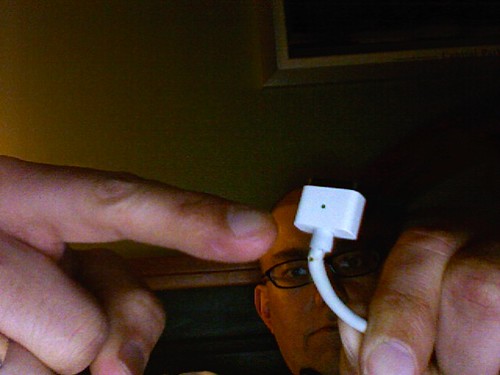
UPDATE: It looks like AppleCare will replace the adapter for me, no charge. I'm taking the old one in to a local Apple dealer today.
Right from when it was announced in 2006, I thought the MagSafe power connector, which pops out if you trip over the cord rather than dragging your laptop to the ground, was a smart idea. But the sharp angles and minimal strain relief of the design also seemed fragile to me, and I appear to have been right. I know several people whose MagSafe adapters have failed exactly as mine is: the cord wears through right next to the computer end of the connector.
Conversely, my wife's round iBook connector continues to work just great, even though it is a year older, and it's rare to hear of those adapters failing in a similar way at all. The new MagSafe design for the MacBook Air seems like it might be sturdier, but I don't think the actual power brick is rated for enough voltage for my bigger MacBook.
The pity is, because Apple has patented the MagSafe design and has not licensed it to other manufacturers, you can't buy yourself a third-party MagSafe-compatible power adapter with a better connector. So whether AppleCare warranty covers it or not, I'll end up with a similar flawed design, which may fail on me again in a year or two.
Labels: apple, design, macbook, repairs
06 May 2008
The curse of the new-ish lens
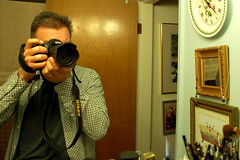 More than 15 years ago, the house I was renting with a couple of roommates was burglarized. The thieves stole the usual kinds of things—CDs and other stuff that's easy to fence—and included among that was my Nikon FG SLR and lenses. I had insurance, which replaced that camera with the early-'90s equivalent, the F-601.
The new camera came with a pretty decent Nikon lens, a 35–70 mm zoom. But a few months after I got the camera, the zoom ring on the lens became loose and didn't work properly. I sent it in for warranty repair, and then used the lens through two additional cameras (another F601 I bought after the original got dropped, and my current D50) until last spring.
That's when the zoom ring started misbehaving again, and I replaced it with a new Nikon lens, an 18–135 mm zoom that has worked very well for me, and is usually the kit lens for the higher-end D80 SLR. Until the past few days, when the zoom intermittently stopped autofocusing properly. The barrel of the lens also started to feel a bit loose. So I've sent it, like its predecessor, off to Nikon for repair.
I supposed there's a reason the lower-cost lenses aren't as robust as their professional siblings, but it's not like I abuse them. And that old lens did work great for me for a decade and a half after its initial repair. I still have it downstairs, in fact. Maybe if I can get it to behave I can use it while the other one is in the shop—but there's really no need. I have three other lenses that seem to be working just fine.
Labels: geekery, nikon, photography, repairs
02 January 2008
Magnetic kerfuffle
Recently, pioneering web developer Dave Winer became upset with Apple because he took in his laptop for warranty service, the Apple Store replaced his hard drive, and then the store wouldn't return his old drive to him, even when he offered to pay for it. After complaining enough to Apple and on his blog, he eventually got the drive back.
The reason he was upset was that his old drive contained a lot of his property, including source code, personal information, and so on. He was worried that Apple's keeping the drive risked that data, because they planned to refurbish it. There could be a security problem from that, including the possibility of identity theft if anyone ends up getting at the information on the disk:
What if the data on the drive can be recovered? What if there are credit card numbers and other personal information on the drive? Source code? Trade secrets?
Now, as I've noted before, Mr. Winer can be a cranky sort, so when he complains, it's wise to look at the problem carefully before deciding whether you agree with him. Some, including Matt Deatheredge (via John Gruber), initially argued that:
If the computer that needs to be repaired has sensitive information on it, I back it up and wipe the hard drive, restoring the default system on it.
Many people, including me, emailed Matt with variations of this point: If you take your drive to Apple (or anyone else) because it's died from hardware failure (which is presumably what would be covered under warranty), you might not be able to erase it. And if you take superhuman security efforts as some recommend on a dead drive (big magnets, drilling holes in the platters), Apple is going to say, "We won't cover this—you destroyed the disk."
Now, the risk of people poking around on your dead hard disk is mostly theoretical, although it is possible and has happened. And no one is yet sure whether Winer's disk was actually dead, or could have been resurrected enough for him to erase it before he sent it for repair. As Deatheredge notes in a big update to his post:
What happens if the drive is so damaged that you can't erase it at all? This case [...] seems genuinely problematic.
The real solution, other than for Apple to offer to give you your drive back (even for a fee), would be to encrypt anything important on your disk, or the whole thing, but few people do that. I have done it for some of my information, but not all, and when my MacBook drive died last year and I sent it back to Seagate, I was unable to erase it first. I'm not worried, but if I were paranoid, I might have eschewed a warranty repair, bought a new disk, and destroyed the old one myself.
But I didn't. Ooh, living on the edge.
Labels: apple, davewiner, geekery, johngruber, repairs
12 September 2007
The brightness
I was a bit disturbed this morning when I sat down on the porch with my MacBook and saw a strange bright blob in the middle of the LCD screen. I thought the display might be damaged, but when I moved the laptop the spot went away.
Then I realized that the spot was actually the light of the sun, which is so bright that it is shining through the translucent Apple logo on the back of the lid, and illuminating the centre of the screen from behind. (Normally the logo is lit up the opposite way, by the lamp from the LCD panel.) I guess you could call it a design flaw.
Labels: apple, geekery, macbook, repairs, sunshine
21 June 2007
Backups mean not having to say you're sorry
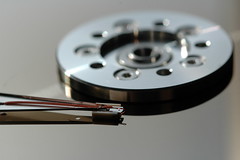 It turns out that my dead hard disk is still well under its five-year warranty, and that Seagate, the manufacturer, has an efficient online return system that helped me diagnose and then set up a return merchandise authorization (RMA) for it, including printing a shipping label for me.
So rather than go through the rigamarole of trying to rescue any data from the drive (as far as I can tell, it's not even spinning up), I mailed it off to Ontario a couple of days ago, and Seagate will send me a new replacement that I can drop in its place. In the meantime I'm using the stock MacBook hard disk, and it's working fine.
Because of my backup regimen, I lost so little data that all I've had to do is go through a few pages of my Flickr photos and re-import the missing ones into iPhoto—nothing else critical is missing. At least not that I've discovered so far.
So I should have a new drive to put into the MacBook next week, and I can use the one I have now once again as an external backup. One thing I do need to do is take some of my recent backups offsite, because right now I'm protected against failures, but if we get burglarized or the house burns down, important data could still be at risk.
You should do the same with your backups. You do have backups, don't you?
Labels: apple, backup, geekery, macbook, repairs, seagate
17 June 2007
The curse of the MacBook
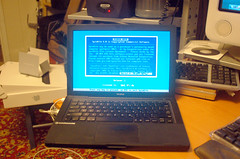 I thought that a few months ago, when my MacBook laptop finally returned from getting a new heat sink, fan, and battery, it would be stable. But no. Today I was working away, just having uploaded a bunch of photos to Flickr, when the MacBook froze up, which is unusual. I rebooted it.
Click click, said the hard disk. No booting. Grey screen, as if there were no disk inside at all. Not good. This disk is completely invisible to the utilities I own, as if it wasn't even there. I have backups, and very little data on the drive doesn't exist somewhere else, so that's not my worry—I learned my backup lessons years ago.
But it is certainly annoying. The 100 GB, 7200 rpm SATA disk drive is just over a year old: I installed it when I bought the MacBook, putting the stock drive in an external USB housing. It should have lasted much longer than this, but I suspect that all the nasty sudden power shutdowns with the battery problems I had may have damaged it, so that it decided to die today.
I'm typing on the MacBook now, having restarted from my external FireWire backup drive. I've reinstalled the original stock 80 GB, 5400 rpm hard drive and am copying over my data files so that it will work again. It should be in relatively normal shape later tonight.
But I'm not giving up on the bigger, faster drive yet. I don't trust it, but I want to see if I can bring it back to life again. The excellent DOS-based utility SpinRite apparently performs miracles on dead drives like that quite regularly. My dad owns a copy, but it's not intended to run on Macs, and sure enough, when I tried booting his CD on the Intel-based MacBook, it started up fine, but did not recognize the keyboard, so I couldn't do anything.
I'm going to see if I can get a SATA-to-IDE adapter to hook up the disk to one of my dad's Windows PCs, which will run SpinRite and may be able to get the disk working again.
Regardless, I will probably have to get another new internal drive (maybe a bigger one now, 160 GB or 200 GB) as the main one for this machine in the long run. I like this laptop and it has done great work for me, but it's sickly, to be honest.
Labels: apple, backup, geekery, macbook, repairs, spinrite
08 June 2007
How to clean your SLR sensor
 One problem with digital SLR cameras (DSLRs) is that, because their lenses are interchangeable, and unlike "sealed" point and shoot cameras that most people have, they're prone to accumulating dust on their sensors, which can create spots on the images they take. I actually had to return my first DSLR because it came with such spots, rather than developing them slowly over time as is more normal.
In the old days of film, dust wasn't as much of a problem because every time you changed film, you changed the sensor surface. That's also why film cameras could remain useful for decades—you can use modern, higher-tech film in a 50-year-old camera with good results. With digital photography, to upgrade the sensor surface you have to replace the whole camera. That's one reason extremely expensive digital cameras like the Leica M8 are more fetish items than wise purchases.
Anyway, Macworld has a useful article on some tools to help clean dust from DSLR sensors. That includes magnifying loupes, cleaning solutions and brushes, and so on. It's an iffy process that could void your warranty, so it might be wiser to have a dealer do it rather than trying it yourself. I don't need to yet, so we'll see what I decide when that time comes.
Labels: gadgets, geekery, nikon, photography, repairs
29 May 2007
Major repairs
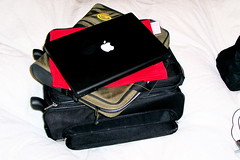 My MacBook is officially one year old this week. Despite our somewhat checkered history over the past 12 months, it is now behaving as it should and is doing a great job with all the stuff I throw at it.
Which is, I guess, more than I can say for my own body these days. I'll be taking myself into the shop in a couple of months too, so both the MacBook and I will have seen major repairs in 2007.
I hope my own goes just as well.
Labels: apple, cancer, geekery, macbook, repairs, surgery