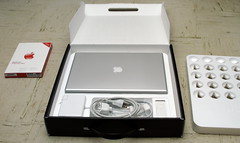
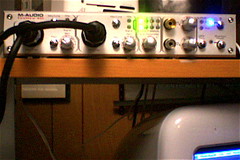
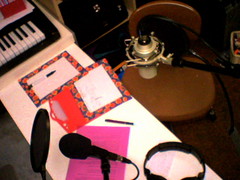
I've put together 14 high-quality original podsafe instrumental tunes from my Penmachine Podcast into a CD album you can buy. It also includes a bonus data DVD with a bunch of cool stuff that isn't on this website. Find out more...
Since words are what count, I don't care which web browser you use at this site. Okay, I do. I prefer you avoid Internet Explorer for Windows, but that's mostly for your own good. It works fine here.
This is "Penmachine.com: March 2006," a page that archives an entire month's entries from my online journal. The latest material for that month is at the top. For my newest entries, visit the home page.
Friday, March 31, 2006 - newest items first # 10:01:00 AM:
It's going to be interesting to see what musicians and DJs do with the two sets of downloadable, Creative Commons–licensed multitracks from David Byrne and Brian Eno's 1981 album My Life in the Bush of Ghosts, which the composers are going to be releasing for people to remix and incorporate into other works. I may try it myself.
Maybe the results will be almost as entertaining as this gallery of sound effects panels from the old Batman TV show.
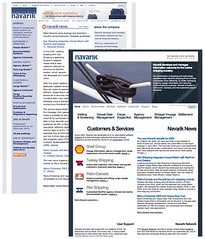
Over at my work, Navarik, we've launched a new website—the first significant update to the design in nearly two years, since Dave Shea designed the last one for us while he was our Creative Director in 2004. Back then I wrote a series of fairly long pieces (parts 1, 2, and 3) about how we did that.
In this case, the process was quite different, with me defining the site structure well in advance in a big diagram, in consultation with other people in the company. Our vastly talented co-op student Andy turned that structure into actual web pages on a staging web server. Then he and our lead designer Darren created a layout and design which they then constructed in XHTML and CSS. Andy also imported, converted, and reformatted the old weblog posts from our ancient Movable Type install to WordPress.
For the content, I either ported over existing material from our current website or wrote new stuff from scratch, with the assistance of Navarik's co-founder Bill and our marketing guy Tomo. Of course there was more new material than I was expecting, and Darren and Andy were shifted to another project which required a bunch of extra people, so I was left to complete the site pretty much on my own. Which was stressful, and led to a bunch of things being put off until after the launch, rather than being there from the start, but the crunch to finish it was actually a whole lot of fun. We put the new site online three days ago, March 28.
Then two days ago, March 29, a bunch of us from the office traveled to Neptune Bulk Terminals in North Vancouver to visit the potash transshipment facility used by one of Navarik's clients, Canpotex. It is a massive operation, where tens of thousands of tons of mineral dirt, mined deep underground in Saskatchewan in the middle of the continent and then brought to the coast on trains hundreds of cars long, are transferred along myriad conveyor belts through two huge storage sheds or onto ships docked in Burrard Inlet. That potash then goes to South America, Asia, and elsewhere by sea to be turned into fertilizer or LCD panels.
Navarik has developed, and runs and maintains, software to help Canpotex coordinate the business of shipping the potash. So we got to go onboard a ship, the delightfully named and spotlessly maintained Frontier Angel, which is registered in Panama but crewed by Koreans, and was taking about a day and half to load 50,000 tons of potash. This monstrous, massive machine was docked alongside other monstrous, massive machines in order to transfer these huge quantities of stuff from shore to vessel.
After days and weeks with my head deep in the structure, content, design, layout, and information architecture of a website, I was struck by the information design aboard that ship. On an oceangoing bulk carrier like the Angel, the usability and usefulness of onboard systems are life-and-death matters: for the captain and crew, knowing the locations of things, the values of readings, and the position and movements of the vessel and its surroundings is critical to their survival, whether when loading cargoes in North Van or traveling through a brutal sea in driving nighttime storms thousands of kilometres from land.
So the information design is often brutally clear. The bridge, for instance, is a sparse place, with clean, empty floors, a steering wheel like a Honda, and everything that could move lashed or bolted down to withstand a pitching sea. When at the wheel, the captain or pilot can look above the large windows and see something much akin to a car dashboard: large, easy-to-read gauges that show the angle of the rudder, the speed and direction of the wind, and so on.
Cabinets and control panels are starkly and clearly labeled (if you know the jargon) and coloured. The two redundant radar installations have large, high-contrast displays with dedicated, highly tactile buttons and controls beneath:
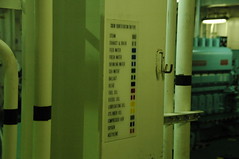
Down in the engine room we saw the clearest example. It was a legend mounted in several different places, indicating what the colours and patterns painted on the various pipes and conduits mean. With it, even someone like me, who'd never been in the engine room of a cargo ship before, could tell that certain pipes were carrying lubricating oil, while others transported seawater:
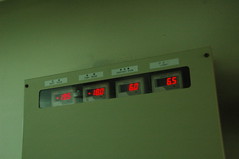
On the way out the door, we spotted a readout showing the temperatures of the various food storage areas on the ship. Again, very clear and easy to understand. I wish our fridge had that—but then again, if food goes bad in our fridge, we throw it out and buy more at the supermarket. For these guys, the nearest supermarket might be 3000 km away over open ocean.
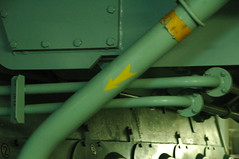
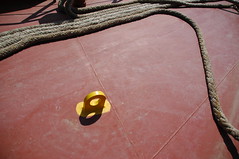
Last were more physical pieces of information design, in the form of yellow paint. The steel tie loops protruding from the deck are bright yellow against the red of their surroundings, so you can see them even in your peripheral vision and avoid tripping or stubbing your toe on them. (My coworker Nathan, a former shipping agent, reports that the yellow doesn't help much at night in the rain.) Other deck features are similarly marked.
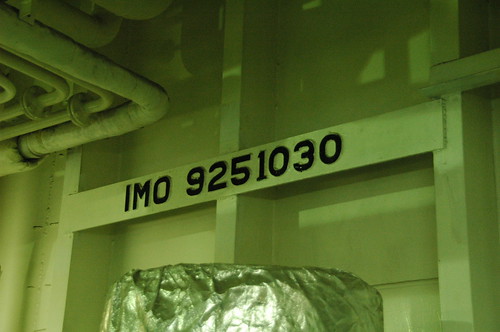
Software and interface designers can take inspiration—even if not direct lessons—from the clarity, purpose, usability, and effectiveness of all those elements of the ship's physical and information design. Here's one more. A ship's IMO (International Maritime Organization) number is like a serial number, or the VIN number on your car, uniquely identifying that vessel no matter whether it is renamed, repainted, or rebuilt. On the Frontier Angel,, it appears in many places, including a plaque on the bridge, above the windows and just to the left of all those gauges.
But the place where it's most obvious is in the engine room, where it is cast in characters nearly a foot high on a plate welded permanently to the front wall:
So even hundreds of years in the future, after the vessel has run its life and been disassembled for scrap, maybe that piece of metal will survive, and the number will still be there, so that archeaologists coming across it, rusting in some forgotten ruin of a warehouse, can find out which ship it had been.
|
Thursday, March 30, 2006 - newest items first # 8:18:00 PM:
Adam Sternbergh's article in New York magazine, "Up With Grups," is interesting:
"It's about a brave new world whose citizens are radically rethinking what it means to be a grown-up and whether being a grown-up still requires, you know, actually growing up."
"In part, because how can their parents hate Interpol when they sound exactly like Joy Division? And in part, because how can their parents hate Bloc Party when their parents just downloaded Bloc Party and think it's awesome and totally better than the Bravery!"
"If you're 35 and wearing the same Converse All-Stars to work that you wore to junior high, are you an old guy sadly aping the Strokes? Or are the young guys simply copying you? Wait, how old are the Strokes, anyway?"
"One guy was telling me his son was really into Wilco. And I was telling him that's lame. Because Wilco is so over."
"How great for a child to see their parents loving what they're doing? It's a delicate balance to strike, but when you maintain that balance, its a great thing to teach your children—that they can look forward to doing something they love doing."
"The last time teenagers weren't expected to rebel, it was because they were heading off to work in the coal mines at age 13. Can we really expect to be cool parents and also raise cool kids? Is this youth big enough for the both of us?"
"Remember, the Grup of today is the slacker from 1990 who, fresh out of college, ran smack into the recession and maybe fiddled around with a riot-grrl band, then got a job at 25 for a Web-development company where she wore jeans to work and played Ping-Pong and stayed late and covered her desk in rare Japanese action figures. Now that woman is 35, a VP at a viral-marketing firm, still dressing down because everyone knows that the youth market is where it's at, yet is scared to death she's going to ossify into the same kind of corporate stooge she swore she'd never become. For a Grup, success isn't about how many employees you have but how much freedom you have to walk, or boogie-board, away."
"You see, it's not that Grups don't want to work; they just don't want to work for you."
In the end, Sternbergh posits, it's about "passion, and the fear of losing it."
And now if you'll excuse me, I have to finish editing the website for my open-plan, casual-dress, flexible-hours workplace so I can get home to my basement recording studio and make some more podcast soundtracks while my kids listen to the Tegan and Sara song I bought but they love.
|
Tuesday, March 28, 2006 - newest items first # 12:59:00 PM:
Here's Andy Hong's advice on getting a good live drum sound in a home studio: "This recipe is one way that I achieve that bigger drum sound in the confines of my humble home. Let's go through this recipe in steps."
Thanks to Ian for the pointer. Maybe I'll actually do it one of these days.
Of the many pleasures to be had living in Vancouver, from the relatively mild weather to the spectacular mountains to the lovely seashore to the vibrant young city itself, one of the best is all the nearby islands. It's not difficult to get on a boat or ferry (or two, or three) and find yourself within sight of the city lights, yet quietly isolated at sea.
Last September, Kris Krug posted about his experiences (with a bunch of photos, of course) at the Web of Change meeting on Cortes Island, at the north end of Georgia Strait near Campbell River. At the time I thought it looked like a cool event, in an extremely West Coast change-the-world-but-stay-laid-back way.
Well, now the same facility on Cortes, Hollyhock, is hosting "Word Power: Finding Your Blog's Unique Voice" from May 17 through 21, featuring Alexandra Samuel and Rob Cottingham. I know Rob from among the Web 2.0 cabal here in Vancouver, and he asked me to post about the event, but I would have anyway. Why?
Well, even though I'm unlikely to attend because of many other obligations, if you're going to get together to talk about blogging—and more importantly, to talk less about the tech of blogging than the writing and social aspects of it—why not head off to a beautiful island retreat? It ain't cheap ($400 Cdn, plus meals and accommodation), but if you're looking for a pleasant vacation that will feed your geek brain too, why not?
|
Sunday, March 26, 2006 - newest items first # 1:57:00 AM:
I just watched a rerun of Saturday Night Live from last month, when Steve Martin hosted and Prince was the musical guest. Sadly, the comedy wasn't anything outstanding.
However, Prince is quite possibly the most naturally talented popular musician of the past quarter century. His opening number, the Hendrix-meets-Santana song "Fury," featured some absolutely incendiary guitar playing—which was even more impressive for a guitar geek like me when I saw and heard how he was tap-dancing on his effects pedals the whole time, and singing.
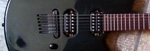
His later duet with singer Tamar rocked in an entirely different way: Prince himself hung back as a mostly backup vocalist, playing mean, growly funk rhythms on his classic Telecaster (possibly the same one in the photo here, from the 1980s) through all sorts of starts and stops, always deep in the groove.
In both performances, his raw musical energy was palpable. He well deserves his comeback—and any money you spend on his music over at iTunes using my affiliate link. Ahem.
|
Friday, March 24, 2006 - newest items first # 12:47:00 PM:
My boss Bill got himself one of Apple's new MacBook Pro laptops last week. So far he's underwhelmed. Other than the built-in iSight camera, it looks nearly identical to the 15" PowerBook it replaces, and non–Intel-native applications run more slowly than they did on the old machine.
While the 17" iMac I use at work is great, I do miss having a laptop like my wife's 12" iBook for doing work (and play) on the road. The MacBook doesn't appeal to me either, however. It's too similar to its predecessor, and not really the form factor I'd be looking for.
We'll have to see if Apple's iBook replacement (perhaps the MacBook, sans Pro) is interesting whenever it's released.
Not that I could afford one even if it were, of course.
|
Wednesday, March 22, 2006 - newest items first # 1:17:00 AM:
If you head over to my wife and her friend KA's Lip Gloss and Laptops podcast blog, you'll notice some new things:
It's Wednesday, so Episode 4 ("Cheeks!") is out, featuring stuff about blush and other cheeky stuff, info about spray-on tans and "junk in the trunk," and so on.
As usual when a new episode comes out, there is a new promo for the next episode, coming March 29, 2006. And the promo is a song, with a nice bompy beat and lots of hand clapping.
Most significantly, at the top of the pages and in the sidebar, you can see that Lip Gloss and Laptops has just joined the foursevens podcast network, which is organized by Tod Maffin.
So my wife and her co-host have joined a group of other cool podcasters, and may attract some sponsorship and such stuff if things go well.
If you listen to podcasts (or even if you don't), I encourage you to fill out the short two-page foursevens podcast survey and you'll be entered to win an iPod nano. No purchase necessary, skill-testing question required, yadda yadda etc.
|
Tuesday, March 21, 2006 - newest items first # 12:33:00 PM:
I like the Mighty Mouse that came with my iMac at work, but it does seem a bit pricey as an add-on accessory of you buy it separately. Now, via Ars Technica, perhaps we know why.
Lift it up in a dark room and the light pattern on your desk looks like the face of a mouse. I tried it, and yes, it works.
My wife's podcast, Lip Gloss and Laptops, will have a brief mention, and maybe some photos, in the Metro free daily newspaper here in Vancouver tomorrow, Tuesday, March 21. Of the several free dailies in our town, Metro is the green one, not the orange one (24 Hours) or the red one (Dose).
UPDATE: Lip Gloss and Laptops now has a copy of the page posted on their site.
|
Sunday, March 19, 2006 - newest items first # 10:55:00 PM:
A few years back I bought an Apple LaserWriter Select 360 laser printer (codename "Viper") from my one-time boss Bernie. It's been a workhorse, and one of the oldest pieces of computer hardware in my current setup—the model was discontinued almost exactly 10 years ago. We've been printing to it through a wacky USB-to-parallel printer cable for a couple of years, but that has been unreliable, often depending on unplugging and re-plugging the USB cable to get it to work. Plus it requires that my eMac be on to share with other machines in the house.
Today my wife got fed up and asked me to get another printer. (Go out to an electronics store and buy something? Twist my rubber arm!) I brought home a Brother HL-2070N, which is superior to the old Apple tank in nearly every way. It's much, much faster—no surprise, since it has a 133 MHz RISC processor compared to the LaserWriter's poky 16 MHz CISC one (which was, to be fair, pretty speedy in 1993 when the Apple printer was first introduced, which was before either the Power Macintosh or the Newton had appeared).
The Brother is smaller and lighter, and makes nicer-looking prints. It has a networking port so any computer in the house can print to it, even over our Wi-Fi network, without a host computer. It has a Sleep mode that conserves power, but that lets it wake up when a print job comes in. Its toner cartridges are inexpensive, because the transfer roller is a separate part so you don't have to pay to replace it whenever you buy new ink.
The only demerits it has compared to the old LaserWriter is that it doesn't hold quite as many sheets of paper, the manual feed intake doesn't have a tray to keep multiple sheets on, and it's made largely of cheap plastic, while the LaserWriter has a lot of metal under the skin. And the Brother doesn't have real PostScript support, which the Apple does. Of course, the Brother only cost $250 Cdn, $200 after rebate. The LaserWriter listed for over $1200 USD on introduction.
The Apple printer still works fine—in fact, it would work just great with a Windows or Linux system (the irony!) that includes a Centronics parallel connector. Let me know if you're interested. There's a lot of life left in the toner cartridge, and the printer will be free to a good home. Ditch that inkjet and get something that prints in real black, why don't you?
|
Saturday, March 18, 2006 - newest items first # 11:09:00 PM:
NOTE: This is the first draft of an article I'll eventually post to my essays section in the next few days, with more links, and pictures if my failing digicam cooperates. Please be patient with the typos and such. You can watch it change as I edit it. I also recommend Jake Luddington's Recording a Podcast and Upgrade Your Podcast for Under $200 articles.
I've had a few inquiries about what kind of equipment I use to record my podsafe music and my wife's podcast, for which I'm the engineer and cable wrangler. The setup has changed a fair bit in the past month—even since I last wrote about it—and is now radically different from the stripped-down den configuration I used to record most of my album last year.
So let's take a tour. I get fairly technical, so feel free to skip stuff if it doesn't interest you.
Microphones
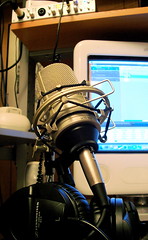
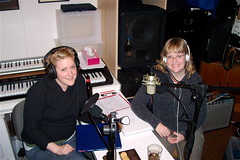
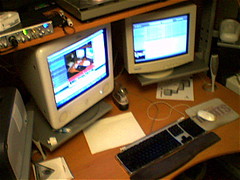
When recording the podcast (which has prompted most of the recent adjustments to the setup), my wife speaks into an MXL 990 condenser microphone suspended in a shock mount on a standard boom microphone stand, with a mesh pop filter to keep the "p" and "b" sounds from creating thudding sounds.
The Marshall-designed 990 (replacing a borrowed AKG C1000s) is an awesome deal of a microphone, often listing at $70 USD or less, and performing as well as some mics costing five times as much or more. It certainly works better for my wife's voice than the more expensive AKG, and has the added bonus of making our basement look more like a real recording studio.
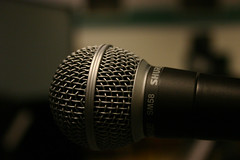
Her co-host KA uses one of the two Shure SM58 dynamic microphones that I own. While it is not a common choice for studio vocal recording, the 58 is almost certainly the world's most popular mic—it, or its pricier cousin the Beta 58, is the typical "ball-head" mic you see on nearly every podium or rock 'n' roll stage. That's for good reason: it's nearly indestructible, it's inexpensive (around $100 Cdn if you look for a deal), and it sounds good.
I found that the SM58 particularly suits KA's voice, so I have it mounted on the same kind of boom stand as my wife's MXL uses, with both a pop filter and a foam windscreen to keep the extraneous noise down. It doesn't look quite as swanky as the MXL, but the sound is what counts.
Signal processing
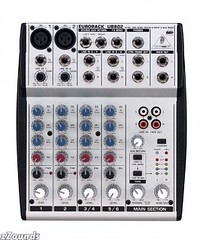
The next part of the chain is the newest, added only in the past week. The two mics are connected using short XLR cables to a Behringer UB802 mini-mixer, which has two XLR input jacks (as well as three other stereo-paired inputs), is one of the least expensive mixers you can buy ($70 Cdn), and also sounds great for the price. (I admit that the control knobs feel a little cheap, and lack detents so you can tell when they're exactly centred, but for the price, I really can't complain.)
The 802 has phantom power for the MXL mic—which, unlike the Shure, requires a small electric current to work—and also provides a bit of control to even out the sound and levels of those two very different microphones. I don't currently use the onboard equalization at all, preferring to keep the microphone signals as unprocessed as possible at this stage.
I have the mic signals panned hard left and right in the Behringer's outputs, so each one can travel separately down a 1/4" patch cable to one of the two channels in my dbx 266XL compressor/gate, which lives in a road rack case because it also finds use as a noise gate for my bass drum when I play with my band.
For the podcast, I'm now using the 266XL as both a noise gate to dampen the sound from the fan for our furnace (which should be less of a problem come summer), and to provide slight dynamic range compression so that the loud and soft parts of the hosts' speech aren't too "peaky," i.e. neither the loud parts too loud, nor the soft parts too soft. For the same reason, I also find the dbx handy when recording bass guitar.
I have the 266XL's compressors set to its "Auto" mode, using dbx's "Over Easy" compression, which is basically a set-and-forget operation. I could adjust the threshold, ratio, attack, and release manually, but the Auto setting works well so I need not worry about it. With the noise gate and compression, the improvement in the raw sound of the recording is quite remarkable compared to the software gating and compression I tried to accomplish in GarageBand before.
Both hosts listen to headphones while recording. KA uses my big Sennheiser HD 280 Pro pair, while my wife has the Sennheiser PX 100 set she got for Christmas, which don't provide much isolation, but which are comfy and sound great.
We've used a few other headphones over time (such as Audio-Technica ATH-M20s from my work), but the Senneiser models are the main ones for now. They were previously plugged into the M-Audio interface (see below) with long extension cables, but now I run the headphones straight out of the mixing board, using a strange little headphone splitter I cooked up with a series of connectors I had kicking around in a Frankenstein series of plugs.
The splitter is so complicated (it includes one of those weird airline headphone adapter things midway in the chain) because it not only splits the signal, but physically bridges the resulting stereo signals to mono so that the two hosts hear everything in both ears, instead of their own voice on one side and their partner's in the other, which can be discombobulating. They now listen to an unprocessed mix of their voices from the mixer, before it hits the compressor or computer. They don't seem to mind.
Digital interface
Last month, along with the MXL mic, I acquired an M-Audio FireWire 410 digital interface, which is what converts the analogue signals coming from the mics, mixer, and compressor/gate into digital bits my computer can use. Previously, I briefly used an Edirol UA-25 USB interface borrowed from work for the same task, and before that—before Lip Gloss and Laptops came along—I recorded directly into my computer's audio-in jack (sometimes with a borrowed Mackie mixer), which had the Mac doing the analogue-to-digital (A/D) conversion internally instead.
Sometimes I also used a neat little gadget called the MicPlug to route a vocal signal from the SM58 straight to USB. All approaches worked, but the audio interfaces sound better and, again, permit greater control of the signal.
The two vocal signals come from the dbx 266XL box, which sits next to the hosts' desk, to the M-Audio interface, perched on a shelf above my computer, through long XLR cables. Importantly, I tried regular unbalanced phono patch cables for the task last week, but got electrical buzz that went away as soon as I switched to balanced XLRs. Since the MXL gets phantom power from the mixer now, I have the M-Audio's phantom power shut off.
In the back of the M-Audio interface is a FireWire cable that sends the now-digital signal to my eMac (and back from it for monitoring), plus two 1/4" cables that go from a couple of the analogue output jacks to my Harmon-Kardon Champagne 2.1 computer speakers, which I use for room sound monitoring. I also plug my HD 280 headphones into one of the M-Audio's front headphone jacks when mixing.
Computer and software
The M-Audio interface has a fairly complex driver program that shows me a virtual mixing board on the screen, with various configuration options. After some initial confusion, I figured out some reasonable settings, and have those saved as a preset that I call up whenever we record. (I use the default settings the rest of the time, so I can listen to my usual computer sound in a normal way.) Otherwise, all the recording tasks are handled by Apple's GarageBand software, which I love love love love love.
Did I mention that I love GarageBand?
Yes, it is limited, but in very intelligent ways. For recording a podcast its feature set and interface are nearly ideal, because it doesn't have too many extra bells and whistles to get in the way. When laying down music, its simplified screen and great collections of loops, samples, and MIDI instruments are awesome.
GarageBand does demand more system resources than it should—on our eMac, I have to make sure that all other applications are shut down, that the screen saver and energy-savings features are deactivated, and so on to ensure smooth recording. Yet that seems to be true of most audio apps, and we can record to the internal hard disk without trouble, so that we don't have to use an external FireWire drive for the sound files.
I don't actually use GarageBand in its podcasting mode, because, in a puzzling decision, when you choose that Apple seems to want it only to export the final audio mix as a lossy AAC file, not a lossless and uncompressed AIFF file—which I much prefer to work with—as you can do with music-mode tracks. So I record the podcast as if it were a song with no music, just speaking, and with each host in one channel so I can adjust their relative levels and signal processing afterwards.
Now, the show itself is entirely the hosts' business. They spend time during the week researching their topic, visiting stores and doing interviews, reading up, and making notes. (On Friday evening, our recording day, they often finish off their notes on looseleaf paper and flash cards while I'm getting the gear set up and tested.) Once I have the whole rig ready and they are seated at their mics, I leave the room and keep an eye on our two daughters and KA's son "C" upstairs (they're often here during recording, since C's dad is working nights right now). My wife and KA emerge when they're done, some time in the following hour.
I do need to let go of my audio control-freak tendencies and show the hosts how to record and post the podcast themselves one of these days, I think. That's going to be especially useful when they get to the stage of recording interviews in the field, which I'm sure they'll do.
Post-production
Once the main recording is done, I may wait till Saturday morning before I add theme and background music, bumpers, and promos to the mix as separate tracks in GarageBand, then adjust mix and levels. Or I may do that right away. I do very little editing of the conversation between the hosts because I prefer to keep its natural sound and flow.
I do find natural breaks in which to insert promos and the like, and trim "off the air" talk from the beginning and end of the file. I mix so that my wife is slightly to the left in the mix, and KA a bit to the right, which brings out the conversational nature of the show when you listen, especially in headphones. But I don't pan their voices hard left and right, which would be disconcerting.
Next I go through a bit of post-production rigamarole that is more than is strictly necessary, but keeps the content and audio quality high. I export the mix to iTunes, where I convert it to an MP3 that I upload to a temporary server location so that my wife and KA can approve it. If they've recorded separate audio for their own weekly promo, I'll do the same for that—or I'll assembled it from bits from the show itself.
Once they have approved the mix, I make any adjustments in GarageBand, export to iTunes, convert the AIFF file to WAV, open that in the free Audacity sound editor, and master the recording by boosting the volume and perhaps applying some more dynamic range compression and leveling. Then I save the file, import it into iTunes again, and convert it to an MP3 file at 80 kbps stereo, which for a typical podcast yields a file between 15 and 32 MB in size. I add ID3 tags and an album art image, as well as a copy of the shownotes in the Lyrics tag area.
Posting the podcast
That whole process happens in fits and starts, since we don't actually post the show until Tuesday evening, so there are four days in which to make and listen to the mixes, then adjust as necessary. During that time my wife and KA create shownotes as a draft blog post for their site, and I adapt those for the ID3 tags in the MP3 file and the actual podcast episode page.
For the actual posting of the podcast, I started out using Apple's new iWeb, which is an intriguing if deeply flawed program. On the plus side, it provides great control over the podcast shownotes pages that appear, automatically adjusts images, creates archives and index pages, and generates the RSS feed for you. In other words, it makes the posting of podcast pages quite streamlined.
But the web addresses it creates are long and awful monstrosities; there's no easy way to create your own page templates; the upload process is awkward if you don't use the .Mac hosting service (and we don't, even though I have it, because I don't want the site URLs pointing somewhere Lip Gloss and Laptops doesn't control); there seems to be no way to choose another template once you've picked and published one for a podcast; and the HTML code it generates is a very odd beast, being structurally valid, but a semantic disaster that doesn't work well for search engines or disabled users. iWeb is a 1.0 version, and it shows.
So after a few weeks of pulling my hair out with iWeb, for Lip Gloss and Laptops I switched to WordPress, which does things much more cleanly and automatically, and I'm way happier. (I continue to use iWeb to post my own musical compositions as the Penmachine Podcast, more out of inertia than anything else.)
I do a bit of web geeky stuff before uploading the files to the web server, but in summary I just post them to a folder using Panic's Transmit FTP program, then point to them with WordPress. Then my wife and KA can publish their blog post, and I can use the Ping-o-Matic website to notify the various podcast directories and other sites out there that the new show is available. (For my own show, where I still use iWeb, I publish to a folder and then upload it, including the audio files, in one go.)
Lots of stuff and steps, I know, and it could be cut down, but this process keeps the quality of the show high, and we're learning lots as we go.
|
Friday, March 17, 2006 - newest items first # 11:17:00 AM:
Microsoft Word's Track Changes feature is a keen source of confusion, and is by far the most requested topic in the Word seminars I run for editors. (By the way, the next one will be in June—watch for details.)
Yes, even the professionals who use Word every day don't quite understand the Track Changes feature. And you know what? I don't entirely understand it either, but I have a pretty good idea by now. Anyway, I got this question from a reader today, who works for the great Geist magazine:
I'm running Word 97 on Windows XP. [...] I've worked for years with many authors on many manuscripts using Track Changes and I've never had a problem, even when the author is new to the function. But recently two authors have reported that when they open a tracked file from me, whole lines and paragraphs appear deleted (via tracking) when I have actually deleted only a word or two. I've re-sent files as RTF but the problem doesn't go away.
Both authors are running Word on PCs, but neither can tell me what O.S. or version of Word he is using (I'd go over and see for myself but they live at distant points).
If you can illuminate the matter in any way, I would sure appreciate hearing from you.
Usually when that happens, Word somehow figures that rather than deleting a word, you have deleted a whole paragraph and replaced it with one that is identical, except for the one removed word. Most likely that occurs if the word you delete is at the end of the paragraph, because if you delete the paragraph marker (visible if you click the paragraph symbol button in the toolbar or otherwise make invisible things like spaces, tabs, line breaks, and paragraph breaks visible from the menus) it may treat the whole paragraph as deleted.
Similar things happen when you delete one letter from a word, such as an ending s—often Track Changes shows the whole word as deleted and then replaced with one without an s.
If you don't see that behaviour for the paragraphs on your own system, it MIGHT be that later versions of Word (2000 and 2003 for Windows, 98 and X and 2004 for Mac, etc.) treat the tracking slightly differently—Track Changes seems to be something that Microsoft tweaks with every version, which can be frustrating.
I'm completely guessing here, but it's an educated guess. As long as no material is missing, you may have to live with it. And if you leave paragraph markers visible while you edit, as I always recommend, you can avoid deleting them when you don't mean to and maybe not have this situation come up as often. If my guess is right, that is.
|
Thursday, March 16, 2006 - newest items first # 11:07:00 PM:
It was 15 years ago today (give or take a day—I'm not completely certain) that I came out of the hospital after being diagnosed with the Type I variant of diabetes. I was 21 years old.
I've been injecting myself with insulin several times a day, every day, ever since—more than 16,000 times so far. Maybe someday I'll be able to stop that, but right now I wouldn't bet on it.
You know, with all the big conflicts in the world (even between fetuses and mothers), it seems ridiculous that there can be years-long petty running pissing matches about web feed formats and software. But there you go.
So I bought a couple of songs from the iTunes Music Store this morning. For this example, we'll talk about the 11-minute version of "Time Has Come Today" by the Chambers Brothers. I bought it, downloaded it, and transferred it from iTunes to my 30 GB iPod 5G (the video one).
I came to work and wanted it in iTunes on the iMac here. Now, I own that file, and have a license to that song, and my work iMac is authorized to play tracks I have bought from iTunes. But I forgot to copy the file to a server or disk where I could download it at work and add it to my iTunes library. So I wanted to move it from the iPod to the iMac at work.
That is a totally legitimate thing to do, but Apple has made it exceptionally difficult—I'm not supposed to be able to copy music files off my iPod (even MP3s), and as I discovered today, Mac OS X's fabby Spotlight search is disabled for the music files on the iPod, even from the command line, and even when you specify that you're looking for invisible files.
That didn't stop me, though.
Finding my music file on the iPod
I could have manually browsed the iPod file system from the Terminal, but instead I used Panic's great Transmit FTP program. Using the View > Show Invisible Files option, I then chose Go > Go to Folder and went here:
/Volumes/Penmachine iPod 5G/iPod_Control/Music
In there are dozens of folders namd F00, F01, and so on. I sorted by Date, then manually sorted through them to find files modified by day and that ended in .m4p, Apple's file extension for Protected AAC files bought from the iTunes store. A pain, but it took about two minutes to find XBCK.m4p, modified today (iTunes renames the music files it has to four-character names, presumably again to make it more difficult for me to get my own music off of it). Okay, it turns out that the file permissions prevent Transmit from copying the file to the Desktop directly.
Fine. You're not stopping me.
Copying it from the iPod to the Mac
Back to the Terminal and this command:
cp XBCK.m4p /Users/dkmiller/Desktop/Chambers.m4p
If the Mac and iPod had really been obstinate, I could have tried higher administrator privileges using the sudo command in front, which would have asked for my admin password:
It turns out the first one worked, however. Now there's a file, Chambers.m4p, on my Desktop, which I dragged into iTunes and can now play.
Analysis and ranting
All this to get a file I bought to a computer I'm legally and contractually allowed to play it on. Man, DRM sucks. I'll make sure to burn it to CD and convert it to unrestricted MP3 soon, as I do with all my iTunes purchased tracks. Incidentally, there is no similar easy way to remove the DRM copy prevention and the use restrictions from iTunes-purchased video files. Which is why I haven't bought any.
I'm not file-sharing any of these tunes. I bought them and just want to play them (as I am legally allowed to, by the way) on different devices, as I'm easily able to do with tracks from audio CDs, or old LP records. And I make sure that I can do it. It sure is fun to have device manufacturers like Apple serving the people who demand these use restrictions rather than their paying customers, doesn't it? And it's sure working well, isn't it?
By the way, if you buy my CD or download any of my free tunes, you can share them all you like, on as many different machines and with as many different people as you care to.
Related miscellany
Incidentally, here's a Wikipedia article on fair dealing in Canada (similar to fair use in the U.S.A.), which isn't quite directly applicable here, but is interesting.
And I should remind you again that proper headphones are a big deal. I initially listened to the Chambers Brothers tune on the Audio-Technica ATH-M20 headphones I have at my desk at work, which are adequate. Mid-way through I decided to switch to my personal Sennheiser HD 280 Pro set that I brought from home, and which cost twice as much. The quality difference was astonishing, even with the relatively low-quality audio file mastered from a recording made in the 1960s on not-great equipment. So get good headphones. It makes a difference.
|
Wednesday, March 15, 2006 - newest items first # 12:37:00 PM:
John Siracusa compares the evolution of controllers for console vs. handheld video games, and wonders why the handheld devices like the Nintendo DS (and, by extension, the Sony PSP etc.) don't fit our hands better, rather than just our pockets.
And I agree that Nintendo has done by far the best job in making their console controllers comfortable to use.
Want to know about perfume? Even if you don't, the latest podcast episode from my wife and her co-host KA, about cosmetic scents, is pretty interesting.
For instance, according to Google, there aren't many other podcasts that use the word rhinencephalon. And the ending is very cheeky too.
I wrote the groovy little instrumental tune "A Pizza Without Time" (4.9 MB MP3 file) as theme music for the Podsafe Music TV online network, being put together by Lucian. He was kind enough to make it into a music video (26 MB MPEG-4 file) that is also a promo for that new network, and for his contest that offers prizes from $2000 USD on up for submitted music videos.
|
Tuesday, March 14, 2006 - newest items first # 2:55:00 PM:
I was surprisingly annoyed on the weekend when I went to get my hair cut (not at my usual place, I should note) and more got taken off than I expected—or than I thought I had specified.
The past two years were the first time in my life I've had genuinely long hair, and since I hadn't been planning on lopping it off quite this soon, I was angry to have my plans thwarted. That said, everyone seems to like the new/old look, and I'm coming to like it again myself. We'll see what I decide to do when it grows out a bit again.
|
Monday, March 13, 2006 - newest items first # 12:41:00 PM:
Robert Sanzalone has a good reality check on the Vancouver Sun's podcasting article from the weekend. The "top 10 podcasts" list is a bit of a mishmash mystery, though my wife and her co-host were of course pleased to be included. I too found Kerry Gold's analysis puzzling and off-kilter, and Robert's take that the newspaper is treating podcasting like:
...a bottle [...] from the sky [...] picked up by an ancient tribal member to be brought to the "elders" for answers. They "know" the meaning for everything and their razzle dazzled explanation with big words puts everyone at ease...
is spot on.
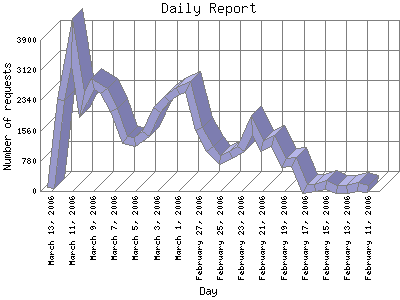
Interestingly, a newspaper mention has a relatively small impact on site traffic, and that impact doesn't seem to have changed much in five years. Back in 2001, I published a short article in the Sun, and it brought in maybe 150 extra visitors for a day or two—which was a big boost for me at the time. This weekend's feature on podcasting also boosted my wife's site traffic by about 150 people per day. But she was already getting 200 to 300, so the impact wasn't as significant.
Oddly, there were quite a few more page requests, which means that those who did visit were requesting more files, such as images, audio, and pages from the actual podcast section of her site. And her site traffic has ramped up a lot faster than mine ever did, totally separately from any newspaper mentions.
There are a lot more bloggers and podcasters and general Internet users out there than there were five years ago. Despite that, a mention in the newspaper doesn't seem to bring any more traffic than it did back then, so the influence of the newsprint medium, at least for sidebar blurbs in the entertainment section in Vancouver, must be declining proportionally.
|
Saturday, March 11, 2006 - newest items first # 9:07:00 PM:
It's been a whirlwind first month for my wife's Lip Gloss and Laptops podcast. She and her co-host KA registered the domain one month ago today, and have already appeared several times on Adam Curry's pioneering Daily Source Code podcast; had visitors from Australia, Ireland, and Colombia; and, as of today, appeared on a Top 10 Podcasts list in the Vancouver Sun newspaper.
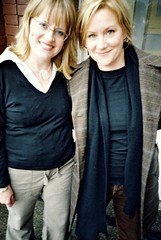
They've only released two episodes so far, with another one just recorded and readying for release on this upcoming Wednesday, March 15. I'm not sure who found their show or who added it to the Sun's list, but thank you if you did! And thanks to Kris Krug for his wonderful photos of my beautiful wife and her fabulous pal this week. I told you he was good.
And I told you it was cool to have a wife who podcasts too. Podstardom awaits.
|
Friday, March 10, 2006 - newest items first # 12:13:00 PM:
If you ever doubt that science is a passionate endeavour, listen to the first 42 minutes of this podcast about the Cassini probe to Saturn, by imaging scientist Carolyn Porco. Even without any of the photos, I got all weepy-eyed as she finished. Really!
I admire that Microsoft is trying something radically different with the user interface for Office 2007, but I also suspect that long-time users will be confused as hell by it.
There is, for instance, no traditional menu bar, and no File or Edit menu, as there have been since Word first appeared on the Macintosh in the 1980s. (There is a big button that takes the place of most of what used to live in the File menu.) Yet, in the long run the new Office might be significantly more usable, since it eschews some of the UI cruft that has been accumulating for nearly 20 years.
Disturbingly, though, this new interface is a relatively recent addition, which is never a good sign. The interface of a computer application should really be the first thing you design, not the last. And it makes me wonder what the next version of Mac Office is going to look like.
I've come to believe that DVDs suck. There are a number of reasons:
They're fragile. I've had DVDs start skipping or become inoperable with much less abuse than old VHS tapes or audio CDs. Many rental DVDs from our local video store, and even some video and data DVDs I've purchased, have failed right out of the box.
They're hard to use. My kids are a good measure here. They were able to master old VHS tapes easily: pop in the tape and it plays, or maybe you have to press a button. If you left off somewhere, it starts right up again there, regardless of which VCR you're using. Not so with DVDs—your player might remember where you left off, if it hasn't been unplugged, or you haven't played anything else in the meantime. But it might only give you 10 seconds to decide whether to continue, and for kids who can't read yet and don't yet have lightning button reflexes, that's too short. Plus every DVD has a different menu system, which means every time we get a new one I'm asked "How do I play it, daddy?"
They take away your control. What is a key frustration of any DVD viewer? Having to sit through the FBI/Interpol warnings we've all seen thousands of times, plus the inane flying production company logos, without being able to fast forward or skip ahead or get to the menu. Why on earth are people who make the movies we buy able to decide how the electronic devices that we own are going to behave? (It only gets worse. See below.)
The standard DVD box is crap. The little tines that hold the disc in seem less prone to breaking than those on CD jewel boxes, but otherwise DVD boxes are inferior: they're thicker and larger, and so harder to store, they don't hold their booklets very well, and the discs tend to rattle around inside. Plus so many of them are coated in super-difficult-to-remove plastic tape at the edges that you need a knife to open it—and might still hurt yourself.
The curse of the editions. Is it pan and scan, widescreen, collector's edition, super-extended multi-DVD edition, tenth anniversary edition? What are the differences? Do I really care about behind-the-scenes making-of featurettes for Dodgeball? (Then again, maybe they're better than the movie.)
Overload. Related to the previous point. As with any high-capacity format, those who produce them seem to want to load DVDs up with as much stuff as possible, regardless of quality. Just as the advent of the LP record yielded 45-minute albums (and later, 80-minute CDs) from artists who really only had a few good singles in them, now DVDs create movies and operating systems and software loaded up with "extras" that many of us never use.
The death of the all-in-one recording box. Want to record a show? You can't use the same box you use to play movies from the video store anymore. If you have a TiVo or other digital recorder, you have that, or maybe you have a media PC of some sort. DVD recorders are an interesting solution, but the discs aren't generally reusable. Not too big a deal, but an annoyance nevertheless.
Region coding. Now we get to the meat of it. Movie company paranoia means that if you buy a copy of Lord of the Rings in Japan or Europe, it won't play on your North American DVD player or DVD-capable laptop. That's not a technical limitation, like the old NTSC/PAL/SECAM video format issues—it's built in intentionally as part of the DVD standard, as a way to try to prevent you from getting a perfectly legal DVD in one part of the world and then playing it somewhere else where distribution agreements might make it more expensive, or just different. But if you travel a lot, or move between continents, or (most importantly) buy DVDs that you can't even get in your home market? You're SOL, because, again, movie companies want to tell you what to do.
The technology is insulting. So many of my annoyances above are about treating customers like criminals: difficult-to-open packaging, region coding, encryption that prevents you from making a legal copy of your DVD onto, say, a video tape so your kids can play it and get jam on it without you having to worry about ruining your original. Combo DVD/VCR units that won't record from DVD to VHS. Upcoming high-definition standards that (in one case) might do away with region coding or (in another) create fewer regions, but which otherwise layer so many digital restrictions on the discs that you might have to buy a new TV because movie makers require that the cable between your player and your display be encrypted so you, the evil evil customer, can't make a copy of their precious, precious $75 million formula romantic comedy.
Yes, the video and audio quality are better than with the old tapes. Theoretically, if perfectly cared for, DVDs should last longer. But those are almost their only real benefits, and I don't know if they are worth it. Too bad, because it's too late—my local video store is purging all their VHS tapes and going all-DVD. I think I'll take as much of my watching as possible to video podcasts.
|
Wednesday, March 08, 2006 - newest items first # 3:16:00 PM:
This page of key SNL musical moments (via Kottke) is a pretty good one, but it misses one deserving event: Neil Young's 1989 appearance playing "Rockin' in the Free World," which had not yet been released on album. He was positively explosive, and proved that it's quite possible for an "old timer" act already 25 years into his musical career to blow every then–chart-topping hair-metal band out of the water—and presage the coming grunge trend by two years in the process.
Even the album version still kicks ass, and remains one of my favourite recordings for its squealing-bucket-of-eels guitar solos alone.
It's strange that searching Google News for international women's day yields mostly results from the developing world, and that the CBC website's feature is "the biggest milestones in pop feminism," highlighting a photo of Lucy Lawless as Xena and checking off on its list such intellectual heavyweights as Phil Donahue, Helen Reddy, Maude, Eurythmics, and Destiny's Child.
I'm the lone man in my house, with a wife and two daughters, so today is important to me. It's not that the day has to be All Serious (the CBC article is pretty entertaining), but International Women's Day is something that still needs to exist, and not frivolously. So I'll note it here, and then get out of the way.
My wife and her friend KA have posted the second episode of their podcast. If you're interested in mascara—well, even if you're not, because I'm not, and some of the history is fascinating anyway—go give it a listen. You'll find out the rather prosaic origin of the brand Maybelline, for example.
|
Tuesday, March 07, 2006 - newest items first # 11:57:00 AM:
An old and a new article about why Digital Rights Management (a.k.a. Digital Restrictions Management, or DRM) is a big mistake. Plus a bonus followup.
Dave Winer thinks that "...if you swapped the people on stage with an equal number chosen at random from the audience, the new panelists would effectively be smarter, because they didn't have the time to get nervous..."
Kirsten Bole on how old ways of musicians making money relate to how musicians could make money again.
Video comparing the new Nintendo DS Lite to the old "non-Lite" model I have. The new one looks like a micro-iBook.
Apparently the Firefox browser brought in $72 million USD last year. Good for them.
Despite its flaws, Roland says that the web development language PHP has the applications, which is why it's eating Java's lunch in the public development arena—something Tim Bray was wondering about.
Vancouver Mac aficionados have wondered whether Apple will ever get around to opening a retail store here. Well, speculation abounds, but there is a bit of semi-concrete data that indicates a spot near the southeast corner of Granville and Dunsmuir would be a possibility.
Or it could be totally wrong. Other speculation has said Yaletown or Oakridge Centre are likely candidates. Toronto already has one store, with two more on the way, so they'd better get moving before we Vancouverites get even more cheesed off at the easterners.
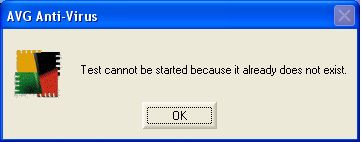
I enjoy the occasional cryptic error message. My most recent favourite comes from my coworker Tony, who used to do some work for Intel Europe, where he encountered this gem:
There is not enough disk space available to delete this file, please delete some files to free up disk space.
Recent controversies, particularly about evolutionary biology, obscure the nature of how scientists do their work. To understand that better, I recommend this week's podcast episode of CBC Radio's "Quirks and Quarks."
In it, you can hear about how scientists in different disciplines approach problems with particular ideas in mind. In one case (how babies learn language), the researcher was right in her hypothesis that newborn humans seem "hard wired" to learn language—but she would have been just as happy to find out she was wrong. Another scientist turned out to be wrong about whether he could identify individual loons from their calls—but that turned out to be even more interesting because loons change their calls when they move between territories, which is much more complex behaviour than anyone previously knew about. There are also two fascinating stories about climate change, demonstrating the subtleties of what often seems like a black-and-white issue.
The key is that the scientists involved want their ideas to be tested, and are willing to be wrong or to be led in new directions. They undertake remarkable intellectual exercises to design experiments or make predictions that will tease out the truth—find out, for instance, how they "ask" newborns what they're interested in, or how they determine how carbion dioxide levels changed in Europe during the Middle Ages. Scientific researchers are not, in general, as dogmatic as the stereotypes imply. Indeed, if they are they can't be very good at their jobs. Even when they are highly opinionated, as Phil Plait is on the Chris Pirillo show this week, those opinions come from trying to understand what they can about the universe, and frustration with those who would rather believe something than discover it.
Incidentally, the last half of that Pirillo Show episode gives great general advice about buying a telescope. While I'm not an astronomer, amateur or professional, my dad has been looking at the sky from a young age, and I grew up with telescopes as much a part of the house as cookware or furniture. There's good stuff in that podcast.
|
Friday, March 03, 2006 - newest items first # 9:51:00 AM:
"We're all very competitive," says Laforet [of photographing sports at the Winter Olympics]. "But we all use the same cameras and lenses, and we have equivalent positions for the most part. So what gives you an advantage as a photojournalist are your wits, your eye, the amount of research you do, and the speed with which you can deliver images."
|
Thursday, March 02, 2006 - newest items first # 10:08:00 PM:
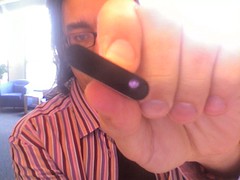
Following up on this site's birthday, here are all the face portraits I could find that I've used up in the corner there:
The one that appears in both colour and black and white versions lasted by far the longest, from early 2001 until late 2005, when my hair got too long and I bought new glasses, and so didn't quite look like that anymore. It was taken with my camera by my then-coworker Barb Gass, mere days before I was laid off from that job as the tech flameout of 2001 took hold.
In order from top left, the the pics were taken by my wife in our den, by another co-worker at a meeting on a snowy March day in 2000 atop Grouse Mountain in North Vancouver, by Barb at Maximizer in January 2001, (second row) in our bathtub at silly Halloween time in 2004 (thanga very mush), by the iSight camera attached to an iBook in our hotel room in Seattle before Gnomedex 2005, a long time ago in a galaxy far far away, and by the iSight camera attached to my iMac at Navarik, where I work now.
This month marks 9 years since I first created this website on an old Mac using the SimpleText editor and an ancient version of Photoshop. Some things still persist from those bygone days, including the odd 100x88 pixel size of my little portrait in the corner, the wording of my intro text, and a couple of my essays.
Last month I hit what I think is a new record for the number of different countries from which I've had visitors to this website: according to my web server, we're up to 127 different ones (discounting the #3 result, "unknown").
The top results, unsurprisingly, are the U.S.A. and Canada, but I was surprised to see, for instance, Latvia beating out South Korea, Finland, and New Zealand—or Vietnam ahead of Norway and Israel. I even had visitors from Kyrgyzstan (as many as Bermuda—three—and more than the one from Belarus!), Nepal, Myanmar, Madagascar, and Cambodia.
This is a moderate to low traffic site in the scheme of things. Something like 1200 people come here every day, almost all of them arriving from some Google search or outside link. Still, I have anywhere between 60 and 100 people around the world who visit the site regularly, and I've heard anecdotally that a number of them have it as their home page, which I still find astounding. Quite a number also read my RSS feed, but I don't know how many individuals that represents.
Still, in 2005, the site had close to 350,000 visitors, viewing over a million web pages, and whose computers slurped up almost 150 GB of data from my site (that last amount will be much larger this year—since I started podcasting my original free podsafe music, my monthly bandwidth usage has gone up to nearly 30 GB so far).
It's been awhile since I've estimated how many words I've written in this journal, my blog, which started in late 2000. If I've kept up my writing rate of roughly 4,800 blog words per month since 2004 (and I may have accelerated), it's now well over 300,000 words (totally aside from all the other stuff on this site), or 800 pages worth of print—a little over half the length of War and Peace.
Here's a neat tip I just found at Apple's website:
You can use the built-in iSight camera to see if your Apple Remote is emitting a signal. A digital camera or DV camera with an LCD display will work too. Infrared beams are invisible to the human eye, but most digital camera and video cameras use Charged-Coupled Device (CCD) chips or image sensors that are sensitive to infrared light.[My emphasis - D.]
To use an iSight or digital camera to test your Apple Remote, follow these steps:
Turn on the iSight by opening the video preview window of iChat. If you are using another camera, turn it on so you see a live picture through the LCD.
Point your Apple Remote toward the lens of the camera.
Press and hold the Menu button on the remote while looking at the video preview window or LCD.
If you see a faint blinking light coming from the Apple Remote in the video preview window or LCD, then the remote is working properly.
If you don't see any blinking light, replace the battery in your Apple Remote and then test it again with your iPod Hi-Fi.
I was having some trouble that turned out not to be the battery, but an improper pairing of the remote with the iMac, but I sure thought that tip was cool.
Of course, if the remote had something on it that lit up when you pressed a button, this wacky hack would be unnecessary. How very Apple.
A re-pod of "Stop Yield Go Merge," which I originally posted last summer and which is the third track on my album.
"Marina Bay - Remastered" (3.1 MB MP3 direct download) is interesting because the new version sounds much dreamier than the gritty original (3 MB MP3 direct download), although they both come from the same recording—they show how much impact the mastering of a recording (in this case, both versions are by Les Thorn in New York City) can have on the final vibe of a piece of music.
"Stop Yield Go Merge" (2.9 MB MP3 direct download) on the other hand, was the first track Les ever mastered for me, back in September 2005. Previously I had been releasing my podcast tracks as they came out of GarageBand and iTunes, effectively unmastered, and the difference in that first track—which he did for free and offered to me out of the blue—was startling. I've had him remaster pretty much every track I've done since, including my entire Penmachine Sessions CD.
|
Wednesday, March 01, 2006 - newest items first # 11:52:00 PM:
My generation draws the Internet as a cloud that connects everyone; the younger generation experiences it as oxygen that supports their digital lives. The old generation sees this as a poisonous gas that has leaked out of their pipes, and they want to seal it up again.
Philip Greenspun can be a cranky bastard, but he is often brilliant. In response to the question of why there aren't more women in science, he writes this stinger:
Having been both a student and teacher at MIT, my personal explanation for men going into science is the following:
young men strive to achieve high status among their peer group
men tend to lack perspective and are unable to step back and ask the question "is this peer group worth impressing?"
Or:
Adjusted for IQ and working hours, jobs in science are the lowest paid in the United States [so there is one more] possible explanation for the dearth of women in science: They found better jobs.
I have a science degree, in marine biology. I came out of it in 1990 realizing that I was qualified to wash glassware in someone's lab unless I went to grad school, in which case I might be qualified to order the glassware for not much more money. Now I'm a writer, editor, web guy, drummer, and dad. I'm probably happier and better paid than if I had become a scientist. It's sad.
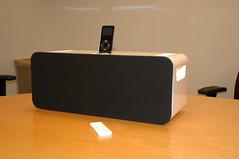
I'm puzzled about a couple of things about the new iPod hi-fi sound system from Apple:
Why no USB/FireWire cable connection so you can sync your iPod while it's in the hi-fi, with your computer nearby?
Why no way for the iPod to fold down or otherwise be stored while you move the unit?
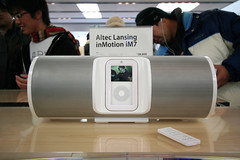
Other products, from the Logitech mm50 (less than half the price) to the Altec Lansing im7 (a bit cheaper) include some of those features—or in the case of the Altec, even video out.
I'm sure this thing sounds great, but it's not what I would buy if I were in the market for one. Yes, it's nice that it's simple (as pundit Andy Ihnatko said, "You plug your iPod into it, and the iPod becomes really, really loud"), but I think it deserves some improvements, at least to compete with similar but less expensive products from already established audio players.
UPDATE: Doc Searls suggests the Cambridge SoundWorks $50 USD PCWorks speaker system as a better value. Add a Griffin TuneCenter or similar dock (even Apple's own) and you're still saving at least $200 USD. Plus you can separate the speakers.


![[Creative
Commons License - You may reuse my original content from this site non-commercially, with attribution.]](https://www.penmachine.com/images/somerights.gif)

![[RSS syndication feed]](https://www.penmachine.com/images/rssfull.gif)
![[RSS comments feed]](https://www.penmachine.com/images/rss_comments.gif)
![[Penmachine Podcast]](https://www.penmachine.com/images/rsspodcast.gif)







![[Powered by Blogger]](https://www.penmachine.com/images/blogger_button.gif "Blogger powered")
![[Powered by BlogRolling]](https://www.penmachine.com/images/blogrolling_button.gif "Blogrolling makes the link list")


![[Layout with CSS and no tables]](https://www.penmachine.com/images/css_tableless.gif)
![[Viewable with any browser]](https://www.penmachine.com/images/allbrowsers_button.gif)
![[Meets U.S. Section 508a accessibility guidelines]](https://www.penmachine.com/images/sec508a.gif)
![[Weblog Commenting by HaloScan.com]](https://www.penmachine.com/images/haloscan.gif)
![[Video preview]](https://www.penmachine.com/images/planet_ed_preview.jpg)